
Content Snare Alternative - FileDrop File Forms
Create secure document upload portals - Send invites and request documents securely
FileDrop vs Content Snare: Which Tool Fits Your Workflow?
When looking for a way to collect documents from clients, FileDrop and Content Snare often come up as options. Both help you gather files and information without endless email chains—but they take very different approaches.
Here’s how they compare so you can choose the right tool for your team.
Setup & Onboarding
- FileDrop: Sign up, create your upload form, and start collecting files in minutes. No training, no steep learning curve.
- Content Snare: Offers a more structured system with templates and checklists, but setup is more involved. Great for agencies with repetitive, detailed requests.
✅ Best for fast launch: FileDrop
✅ Best for complex workflows: Content Snare
Client Experience
FileDrop: Clients see a simple branded portal where they can drag-and-drop files. No confusion, no over-complication.
Content Snare: Clients get a checklist-based interface with tasks, deadlines, and ability to mark items complete. This is powerful but can feel overwhelming for less tech-savvy clients.
✅ Best for simplicity: FileDrop
✅ Best for structured onboarding: Content Snare
Automation
FileDrop: Provides essential notifications and basic reminders. Keeps it lightweight and straightforward.
Content Snare: Offers advanced automation—scheduled reminders, auto-saves, partial submissions, and ability to reject/re-request specific items.
Security
FileDrop: Secure uploads with SSL encryption and password protection for portals.
Content Snare: Enterprise-grade encryption, PIN-protected links, and granular access controls.
Both tools take security seriously—FileDrop is perfect for most SMBs, while Content Snare caters to agencies handling sensitive client data.
Who They’re For
FileDrop: Accountants, HR teams, small agencies, and SMBs that need a quick, secure, and affordable way to request files.
Content Snare: Marketing agencies, legal firms, and consultants that need detailed checklists, structured onboarding, and client task tracking.
Final Verdict
Choose FileDrop if you want:
- Instant setup without a learning curve
- Affordable, transparent pricing
- A simple branded portal for clients
Choose Content Snare if you want:
- Structured checklists with deadlines
- Advanced automation and reminders
- A tool designed for agencies handling complex onboarding
Stop overcomplicating file collection.
With FileDrop, you can start today—no training, no heavy setup.
- Unlimited Forms
- As much space as you need
- Form Invites - Track users that fill in your forms
- 1Gb per file - unlimited files
- Personalize with your brand
- Save files to our secure cloud or your Google Drive
- Export to Google Sheets




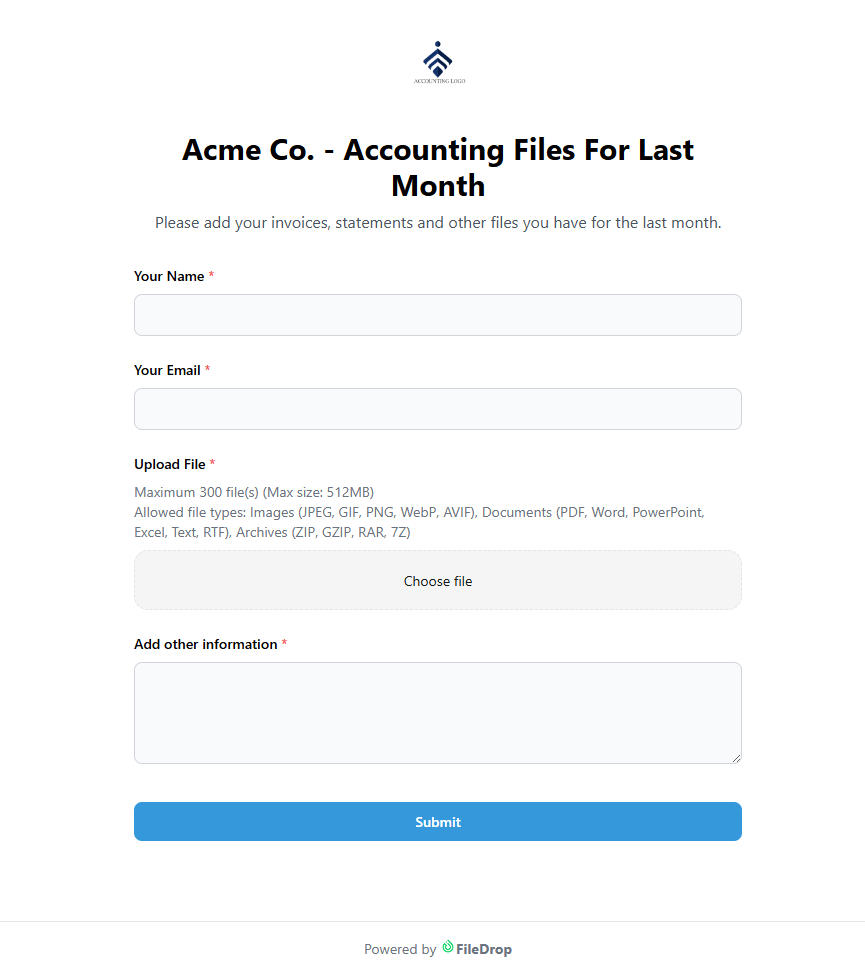

Unlimited Secure Forms
You can create as many forms as you want with any of our paid plans.
Save Files to Google Drive
If you want to save the files to your Google Drive you can do that from the forms settings easily.
Export to Google Sheets
Export all the submitted files and data to Google Sheets with 1 click.
Self Email Notifcations
Receive email notifications from selected forms directly in your inbox.
Mobile Friendly
Your users or customers can fill in and send documents directly from their mobile or tablet.
Bank Grade Security
All files are secured with encryption in transit and end to end to keep client data safe.
Custom Branded Pages
Personalize the way the web form page looks like with your logo or brand colors.
As much space as needed*
We don't count the number of files or the size of the storage you use on our platform.
Cloud Integrations
Users can upload files from PC/Web, Google Drive, Google Photos, Dropbox or OneDrive.
Email Requests - Invites
Invite users to fill in the forms created specially for them. You can send multiple invites per user and track open or if the form has been filled in.
Send Reminders
Easily send reminders to users to upload the documents you need.
Unmatched Upload Speed
Users will experience super fast upload speeds no matter where they are or the device they use.
How it works
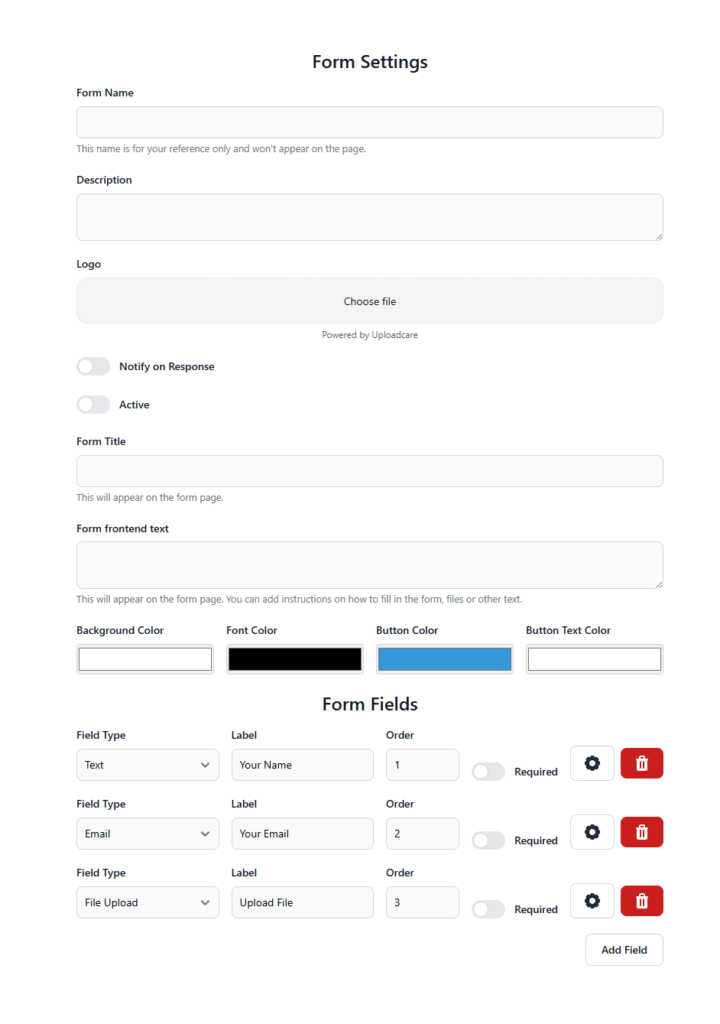
Step 1
Create your form, by default 3 fields are automatically created, name, email and upload field. Add or remove as you need.
Personalize the web form with your logo or color if you wish.
Step 2
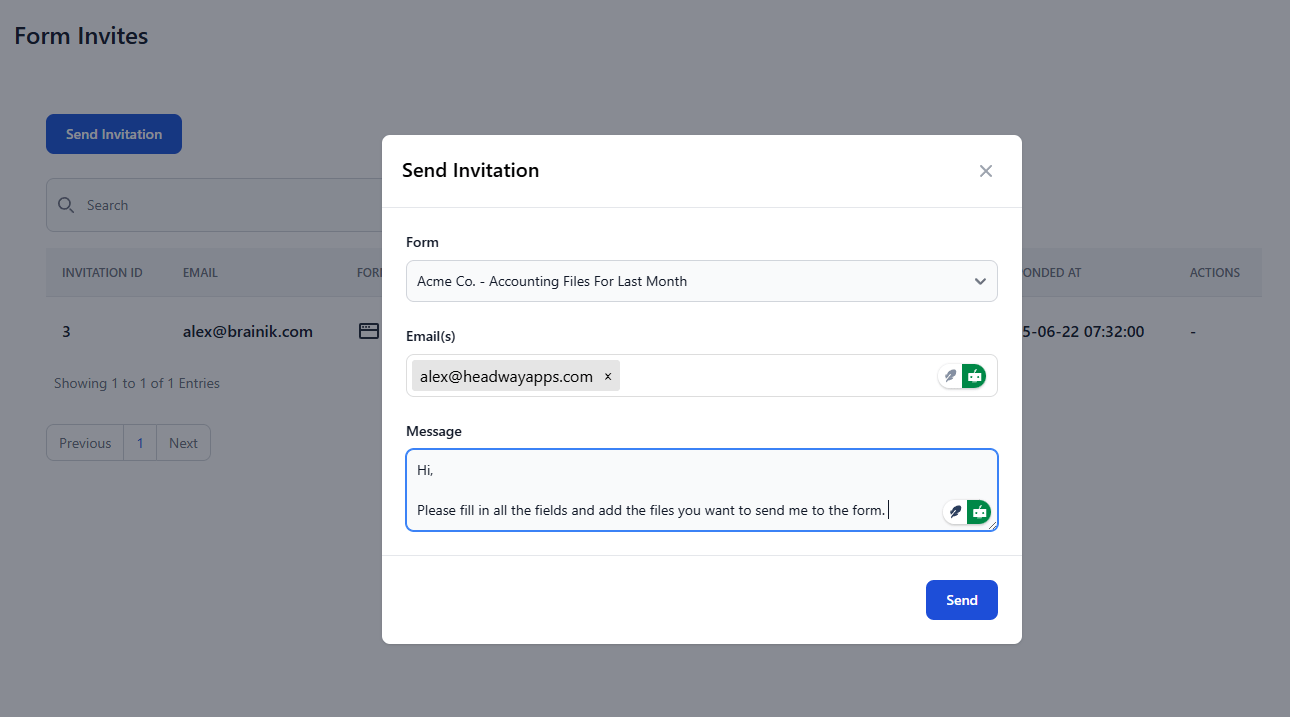
Share your form link with your users or customers. You can also use the invite feature that send an email to your users with a personlized message. Track opens, reads and responses in the dashboard.
Step 3
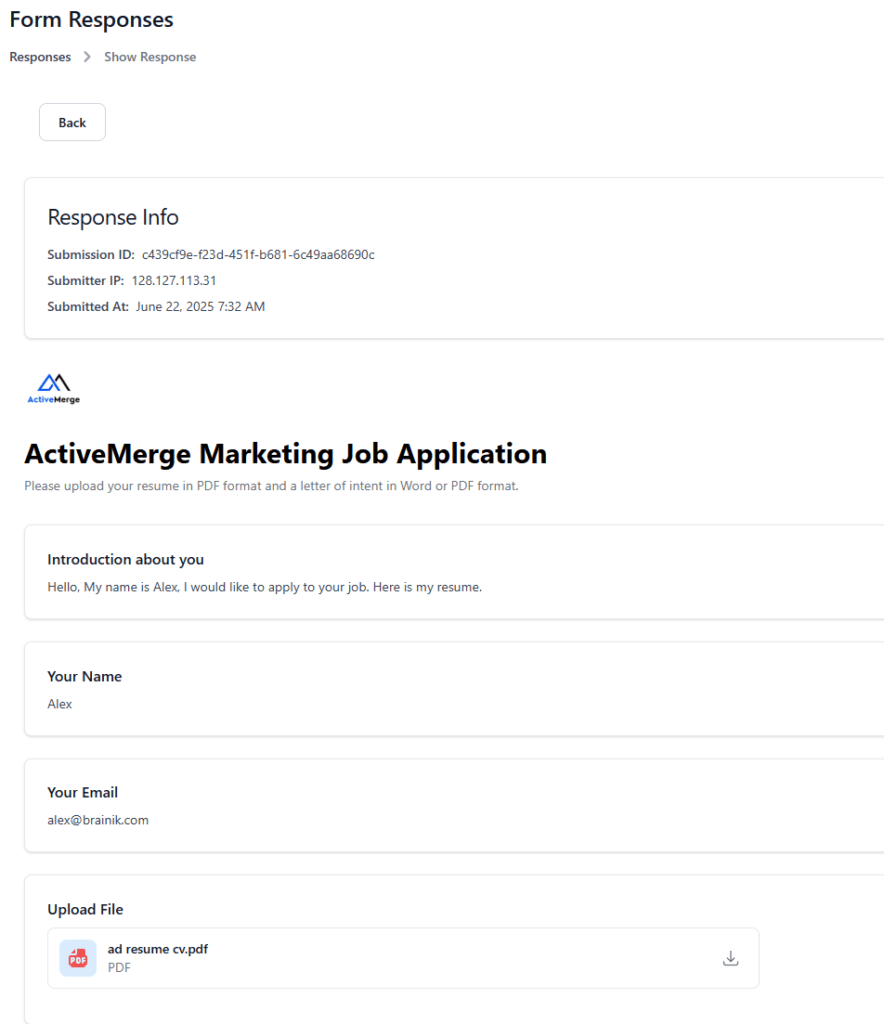
Once an user has submitted a web form with files you can view them in the dashboard. If the user has filled in the form from an invite, the invite will be closed.
Ready to Sign up
Compare FileDrop File Forms with Content Snare
| Feature / Aspect | FileDrop | Content Snare |
|---|---|---|
| Setup & Onboarding | Instant signup, immediate access — no sales call needed | Easy setup with templates, free trial—no credit card required |
| Pricing | Clear, affordable plans, no hidden costs, starting at $19 | Flat-rate pricing starting around $79/month; custom plans available |
| Ease of Use | Very simple, minimal setup, start collecting in minutes | Intuitive drag‑and‑drop builder with checklist-style client interface |
| File Collection | Upload forms & branded portals with drag-and-drop ease | Client‑friendly checklists to request files, text, tables—all in one place |
| Storage Options | Save files directly in Google Drive or FileDrop cloud | Integrations with Google Drive, Dropbox, OneDrive; download all in one package |
| Automation | Basic email notifications & simple reminders | Automated reminders, deadline scheduling, autosave, reject-specific items |
| Security | SSL encryption, password-protected uploads, encrypted storage | Military‑grade encryption, PIN or unique links, secure storage |
| Customization | Branded forms & portals customizable per link | Custom branding, logos, instructions, conditional logic |
| Target Users | Agencies, accountants, HR teams, SMBs needing fast setup | Agencies, accountants, lawyers, consultants—anyone needing smooth onboarding |
| Learning Curve | Very low — non-technical users can set it up in minutes | Low — intuitive UI, drag‑and‑drop, checklist logic |
| Best Advantage | Price + simplicity + immediate access | Simplicity + client experience + time saved (up to 71% less chasing clients) |
What You Can Do With FileDrop File Forms
Request & Receive Files
Create a secure upload form in minutes. Share it via link or email invites. Your recipients don’t need to sign up—just upload and go.
Send Uploads to Google Drive, OneDrive, Dropbox
Automatically save incoming files to your preferred cloud drive, organized by form and user.
Track Submissions & Receive Alerts
Get email notifications for each upload. Review submissions on your dashboard or in Google Sheets.
Mobile-Optimized Uploads
Recipients can submit files from any device with a seamless mobile experience.
Fully Customizable Branding
Add your logo, colors, and custom messages. Make every form feel like it’s part of your brand.
Fast, Large File Uploads
Support for uploads up to 1GB per file with lightning-fast speeds and resumable uploads.
Enterprise-Grade Security
End-to-end encrypted uploads, virus scanning (optional), and GDPR compliance by design.
Automate Workflows (Zapier & Webhooks – coming soon)
Push uploaded files into CRMs, Slack channels, or other tools using native integrations or Zapier.
Send Requests & Collect from Anyone
Use email invites to collect files from specific people. You can even track who hasn’t uploaded yet and send reminders.
Compare Plans
| Feature | FileDrop | Google Forms | Typeform | JotForm | Wufoo |
|---|---|---|---|---|---|
| Secure File Uploads | Yes | No | Limited | Yes | Yes |
| Saves to Google Drive | Yes | Yes | With Zapier | Yes | Yes |
| Export to Google Sheets | Yes | Yes | Yes | Yes | Yes |
| Self-Email Notifications | Yes | Basic | Yes | Yes | Yes |
| Mobile-Friendly UI | Yes | Yes | Yes | Yes | Yes |
| Bank-Grade Encryption (SSL) | Yes | Yes | Yes | Yes | Yes |
| Custom Branding | Yes | No | Yes | Yes | Yes |
| Invite-Based File Requests | Yes | No | Indirect | Manual | Manual |
| File Upload Limit (per file) | Up to 1 GB | Up to 1 GB | 100 MB | Up to 1 GB | 100 MB |
| Workflow Automation | Planned | No | Zapier only | Advanced | Basic |
| API Access | Soon | No | Yes | Yes | Yes |
| White Label Support | Yes | No | Yes | Yes | Yes |
| Pricing (Starting) | Free - $19+/mo | Free | $28+/mo | $39+/mo | $22+/mo |
Who Uses File Forms?
Agencies collecting assets from clients
Recruiters gathering resumes & cover letters
Lawyers receiving confidential documents
Teachers accepting student assignments
HR Teams collecting onboarding files
Freelancers requesting project materials
Frequently Asked Questions
What is FileDrop File Forms?
FileDrop File Forms is a secure, branded file collection tool that allows you to easily collect large files from anyone using customizable upload forms with drag-and-drop functionality.
Can I create branded upload forms?
Yes! You can personalize each form with your branding—add a logo, choose colors, and include intro text for specific teams or departments.
Are the forms mobile-friendly?
Absolutely. Users can fill in forms and upload files directly from any mobile or tablet device, including iPhone, iPad, and Android.
How large can each uploaded file be?
Each file can be up to 1GB in size, and you can upload unlimited files on Pro, Business+, and Executive plans.
How many forms can I create?
Free Plan: 1 form
Paid Plans (Pro and above): Unlimited forms
How do users upload files?
Users can upload from:
Local devices (PC, Mac)
Google Drive
Google Photos
Dropbox
OneDrive
Is file upload secure?
Yes. FileDrop uses bank-grade encryption to secure your files in transit and at rest. Our files are hosted in AWS, the largest cloud provider in the world.
How fast is the upload speed?
FileDrop ensures super fast upload speeds regardless of device or location. Our CDN technology we
How do I receive files?
You receive file submissions directly in your dashboard. You can download the files from the dashboard. You can also receive email notifications when someone submits a form.
Can I track form responses and invites?
Yes, with FileDrop you can:
Send personalized invites via email
Track if the email was opened and if the form was submitted
View responses and uploaded files in your dashboard
What’s the process to collect files?
Step 1: Create your form with default fields (Name, Email, Upload) or customize it
Step 2: Share the form link or send an invite
Step 3: Get notified and manage submissions in your dashboard
Can I integrate with cloud services?
Yes. FileDrop supports upload integrations with:
Google Drive
Google Sheets
If you have more questions or you need help, please contact us.