Document Request & Collection Software
Stop Chasing Clients for Documents. Start Collecting Files Automatically.
Professional document request software with branded file upload pages.
FileDrop’s intelligent document gathering system transforms how businesses collect files from clients.
Replace scattered email attachments, email upload limits, lost documents, and endless follow-ups with professional upload portals that work automatically.
Create custom-branded file request pages with forms that clients can access instantly—no login, no account creation, just simple drag-and-drop uploading.
Embed on your website or use our the FileDrop.me subdomains.

Built for your Business Success
Streamlined Document Management
- Unlimited upload pages and storage
- Email reminders and tracking
- Save to secure cloud or Google Drive
- Export data to Google Sheets in one click
- Bank-grade encryption
- Custom branding (logo, colors, intro text)
Designed for Clients’ Convenience
Frictionless File Submission Experience
- No login or account required – just click and upload
- Mobile-friendly on any device
- Drag and drop files up to 1GB each
- Upload from Drive, Dropbox, or OneDrive
- Lightning-fast upload speeds
- QR code access for easy scanning
Certified for Your Security
FileDrop is GDPR, CCPA, and nFADP compliant. Thanks to our TLS encryption technology, your documents are always processed with an added layer of security.

Secure file management you can trust – Industry-leading encryption and data protection at every step.

Built with your privacy in mind – Fully compliant with EU and international data protection standards.

Crafted with care in the EU – Built to last, adhering to the highest standards of quality and safety.

Unmatched customer support, 24/7 – We're just a message away to help with any concerns.
Why choose FileDrop as your document collection tool?


FileDrop is designed to eliminate the inefficiency and chaos of collecting files via email. With automated workflows, branded upload portals, and built-in reminders, businesses collect documents faster while reducing errors and improving the client experience.
Replace Email Bottlenecks with Centralized File Management
Stop pursuing clients through fragmented email threads. FileDrop replaces disorganized inboxes with a unified, secure document portal that organizes submissions automatically.
Deliver Superior Experience for Staff and Clients
Manual document requests frustrate everyone involved. FileDrop’s streamlined file upload system creates a seamless experience from initial request to final submission.
Document Collection Software Built for Your Industry
Marketing and Creative Agencies
Accept large creative files (1GB+) without compression. Get client brand assets organized in hours, not days.
Perfect for: Brand assets, client content, product photos, video files, campaign materials.
Accounting & Tax Firms
Stop chasing clients for tax documents through email. Create secure portals with custom checklists, automated reminders, and bank-grade encryption for sensitive financial data.
Perfect for: Tax prep, bookkeeping documents, audit requests, financial statements.
Law Firms and Legal Services
Eliminate email security risks when collecting case documents. Track submissions, reject incorrect files instantly, and keep matter files organized automatically.
Perfect for: Client intake, discovery documents, signed contracts, case files
Human Resources
Streamline employee onboarding with mobile-friendly forms and automated reminders. Collect complete paperwork before day one.
Perfect for: New hire onboarding, job applications, benefits enrollment, employee files
Integrations
Google Drive
Save the files received from users in folders in Google Drive
Google Sheets
Track responses with all the data with automatic export of all submissions to Google Sheets.
Airtable
Export to airtable all or selected fields to your Airtable base automatically.
Export to Excel
Export all submissions of a page or just for a user with all the fields, links and files.

Features
Unlimited Pages
You can create as many pages as you need.
Save Files to Google Drive
If you want to save the files to your Google Drive you can do that from the page settings easily.
Export to Google Sheets
Export all the submitted files and data to Google Sheets with 1 click.
Self Email Notifcations
Receive email notifications from selected pages directly in your inbox.
Mobile Friendly
Your users or customers can fill in and send documents directly from their mobile or tablet.
Bank Grade Security
All files are secured with encryption in transit and end to end to keep client data safe.
Custom Branded Pages
Personalize the way the web page looks like with your logo or brand colors.
As much space as needed*
We don't count the number of files or the size of the storage you use on our platform.
Cloud Integrations
Users can upload files from PC/Web, Google Drive, Google Photos, Dropbox or OneDrive.
Email Requests - Invites
Invite users to fill in the forms created specially for them. You can send multiple invites per user and track open or if the request has been filled in.
Send Reminders
Easily send reminders to users to upload the documents you need.
Unmatched Upload Speed
Users will experience super fast upload speeds no matter where they are or the device they use.
Embed on website
Embed the page on your website and control the entire flow.
Custom domains
Personalize the entire flow with your own domain links.
Redirect to any page
Redirect to any page after submission, track your submisison and personalize the flow.
How FileDrop's Document Collection Software Works
Step 1
Create your page form, by default 3 fields are automatically created, name, email and upload field. Add or remove as you need.
Personalize the web form with your logo or color if you wish.

Step 2
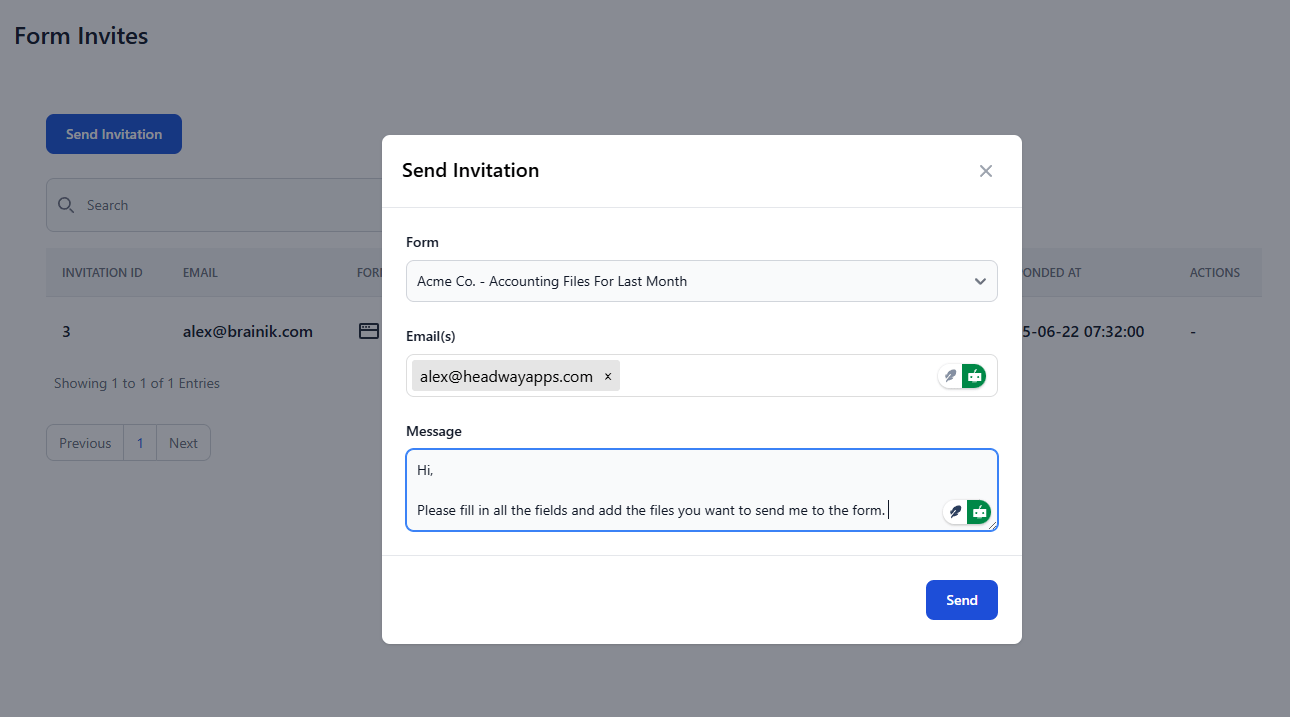
Share your page link with your users or customers. You can also use the invite feature that send an email to your users with a personlized message. Track opens, reads and responses in the dashboard.
Step 3
Once an user has submitted the data with files, you can view them in the dashboard. If the user has submitted from an invite, the invite will be closed.
File Requests
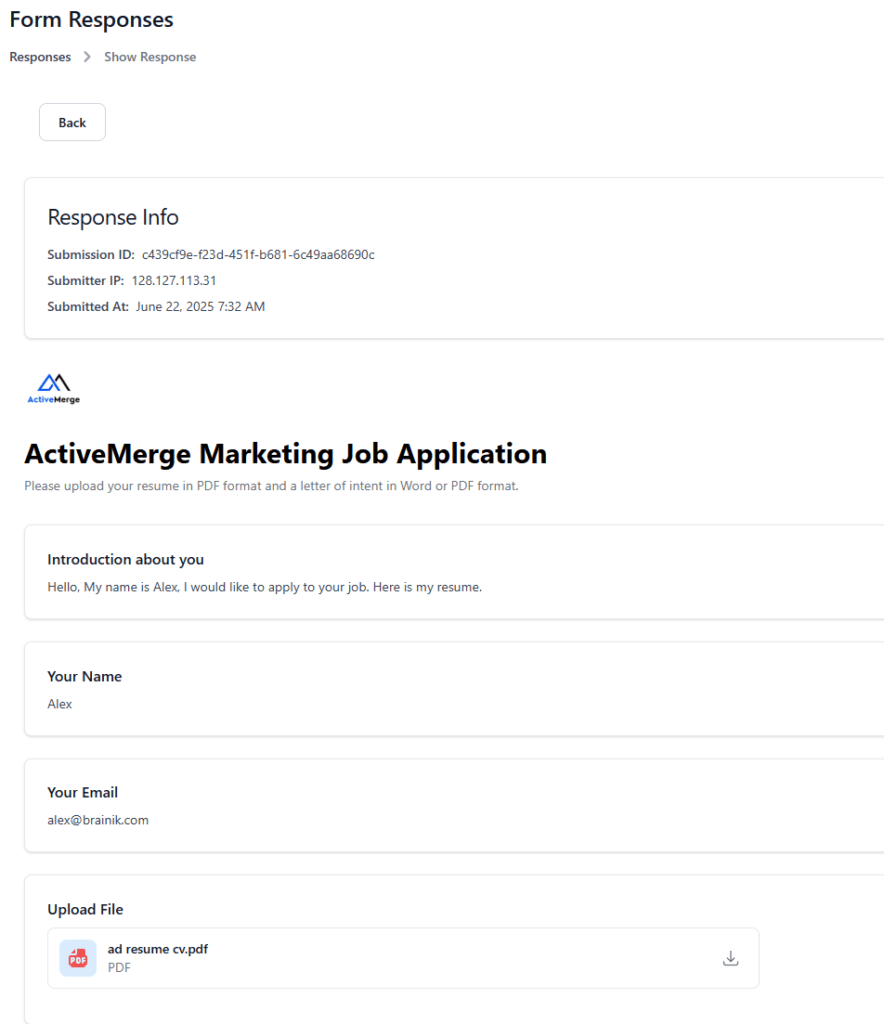
Invite users to branded upload pages for collecting files and information.
FileDrop’s File Request Software can send invites – requests – via email to customers or users to upload files to secure upload pages.
The drag-and-drop interface on the upload pages allows users to upload the files in our secure cloud or your Google Drive.
Track File Requests
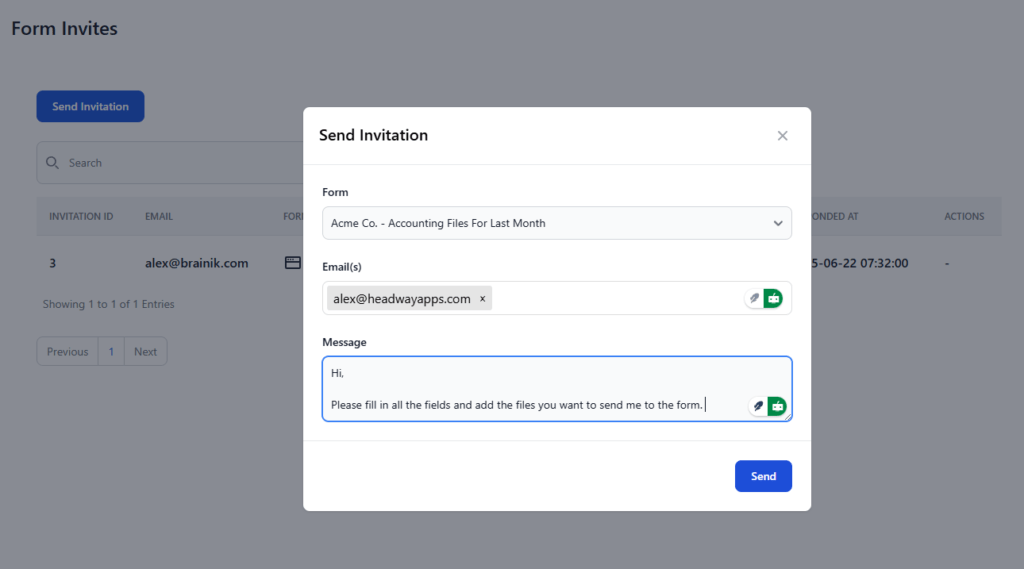
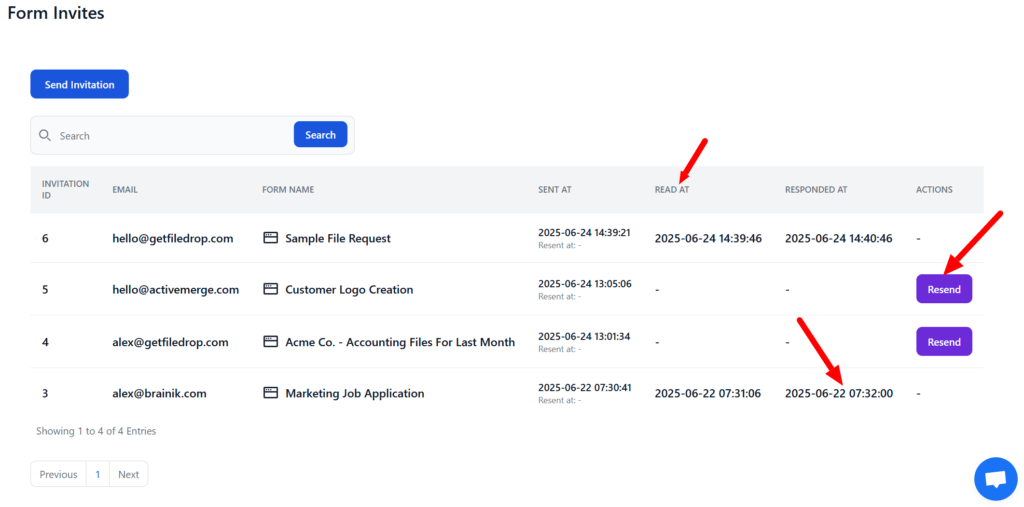
You can follow up and track the responses of the request from the Invites panel.
Here you can view the read at time, responded at time and also an option to resend the request/invite.
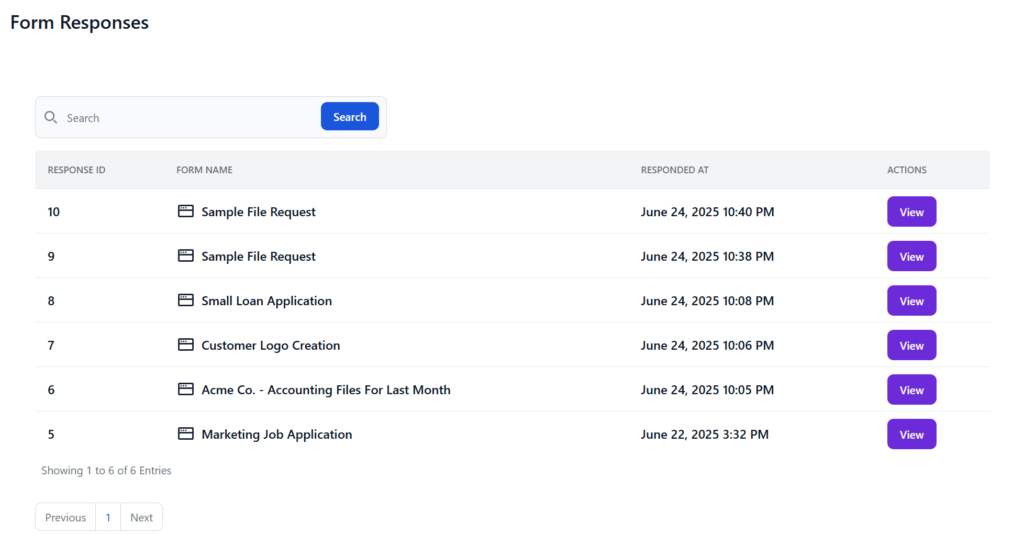
View Responses and Files
View the data the users have submitted.
You can also download the files to your computer.
File Manager
Approval Workflow

Digital Signature Collection

Ready to Sign up
Compare Plans and Features
| Plans | Free | Pro | Business+ | Executive |
|---|---|---|---|---|
| Unlimited Pages | 1 | Yes | Yes | Yes |
| Custom Domain | No | No | Yes | Yes |
| Remove FileDrop Host banner | No | Yes | Yes | Yes |
| Embed on website | Yes | Yes | Yes | Yes |
| No. of files | 50 | Unlimited | Unlimited | Unlimited |
| Submissions | 5 | 150/month | 400/month | 1000/month |
| Email requests | 0 | 150/month | 600/month | 2000/month |
| File size | 20 MB | 1 GB | 1 GB | 1 GB |
| File Storage | 200 MB | 5 GB | 10 GB | 30 GB |
| Self email notifications | Yes | Yes | Yes | Yes |
| Branding options (logo, colors) | Yes | Yes | Yes | Yes |
| Upload integrations (Local, Drive, DropBox, OneDrive) | Yes | Yes | Yes | Yes |
| Google Drive Integration - Save Files in Drive | Yes | Yes | Yes | Yes |
| Google Sheets Integration - Save Data in Sheets | Yes | Yes | Yes | Yes |
| Filter files upload by type | Yes | Yes | Yes | Yes |
| Free Migration | - | Yes | Yes | Yes |
| API | Yes | Yes | Yes | Yes |
Frequently Asked Questions
What are FileDrop File Request Pages?
These are branded upload portal links with information, forms for data and upload fields created for gathering files and content.
Unlike traditional email attachment workflows, FileDrop provides customizable file request forms, automated reminder systems, and centralized organization. Recipients require no account creation—they simply click your link and upload documents.
FileDrop is purpose-built for collecting documents, files, and information from external users including clients, customers, vendors, and partners.
Can I create branded upload pages?
Yes! You can personalize each page with your branding—add a logo, choose colors, and include intro text for specific teams or departments.
Are the pages mobile-friendly?
Absolutely. Users can fill in form in the page and upload files directly from any mobile or tablet device, including iPhone, iPad, and Android.
How large can each uploaded file be?
Each file can be up to 1GB in size, and you can upload unlimited files on Pro, Business+, and Executive plans.
How many pages can I create?
Free Plan: 1 page
Paid Plans (Pro and above): Unlimited pages
How do users upload files?
Users can upload files from multiple sources:
Local devices (PC, Mac)
Google Drive
Google Photos
Dropbox
OneDrive
This flexibility makes document collection easy for clients regardless of where their files are stored. No special software or accounts required.
Is file upload secure?
Yes, see our security page. FileDrop uses bank-grade encryption to secure your files in transit and at rest. Our files are hosted in AWS (Amazon Web Services), the largest and trusted cloud provider in the world.
How fast is the upload speed?
FileDrop ensures super fast upload speeds regardless of device or location.
How do I receive files?
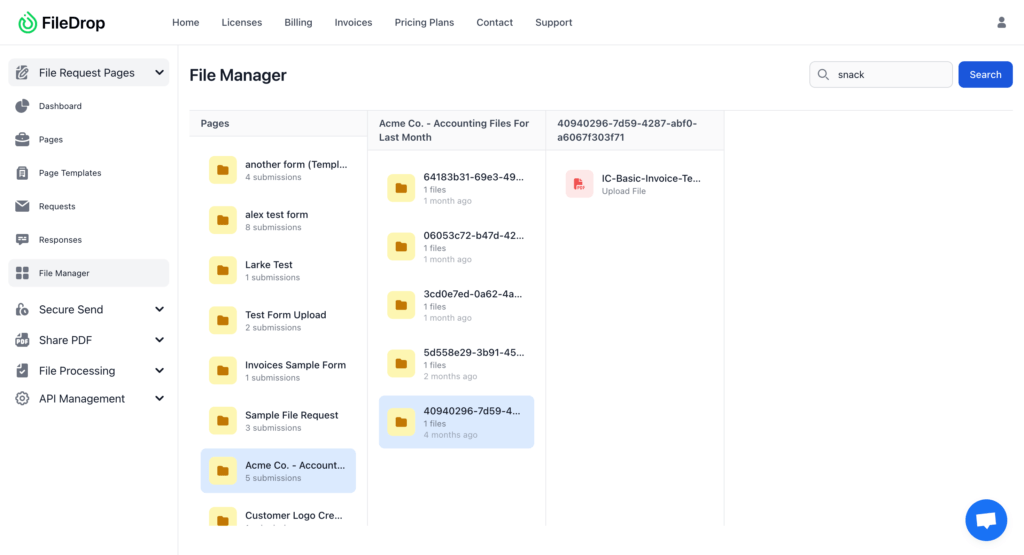
You receive file submissions directly in your dashboard, you can view them in the File Manager. Optionally, you can set a Google Drive folder to receive files there automatically.
You can download the files from the dashboard.
You also receive email notifications when someone submits information.
Can I track responses and requests?
Yes, with FileDrop you can:
Send personalized invites via email
Track if the email was opened and if the request was submitted
View responses and uploaded files in your dashboard
What’s the process to collect files?
Step 1: Create your page with default form fields (Name, Email, Upload) or customize it
Step 2: Share the page link or send a request/invite
Step 3: Get notified and manage submissions in your dashboard
Can I integrate with cloud services?
Yes. FileDrop supports upload integrations with:
Google Drive (coming soon)
Google Photos
Dropbox
OneDrive
If you have more questions or you need help, please contact us.