
Visual Catalog Builder for Images, Products, Assets, and Inventories
Build Shareable Visual Catalogs with Images and Metadata
Build image-first catalogs that are easy to organize, share, and export.
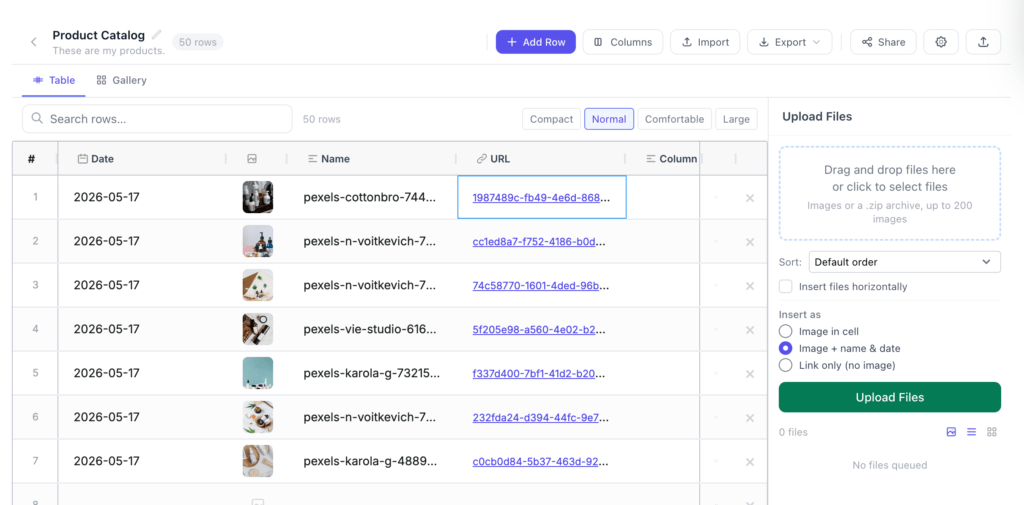
FileDrop Visual Catalogs combine the structure of a spreadsheet with the clarity of a visual gallery. Upload images in bulk, add custom metadata columns, switch between table and grid views, share a private link, and export to Excel with embedded images.
Main features:
- Bulk image upload and ZIP import
- Custom columns for metadata
- Grid and spreadsheet-style table views
- Shareable read-only catalog links
- Excel export with embedded images
- PDF Export with design options
If you are looking at an alternative to insert images in Google Sheets give our Catalogs feature a try.
Comparison
Visual Catalogs vs Google Sheets
Spreadsheets are useful for data, but images are often awkward, slow, and hard to review.
Visual Catalogs make images the center of the workflow while keeping the structure of rows and columns.
Visual Catalogs vs DAM Software
DAM software can be powerful, but it is often too much for teams that simply need image catalogs with metadata, sharing, and exports. Visual Catalogs are lighter, faster, and easier to adopt.
Visual Catalogs vs Shared Folders
Folders store files, but they do not track status, notes, dates, SKUs, owners, or client-ready views. Visual Catalogs keep files and context together.
Use cases:
- Product catalogs
- SKU image libraries
- Seasonal collection planning
- Wholesale line sheets
- Product launch checklists
- Marketplace listing preparation
Features
Upload Images in Bulk
Drag in images, select multiple files, or upload a ZIP. Visual Catalogs create rows for your images and keep everything organized in one place.
Add Custom Columns
Track the fields that matter to your workflow: name, SKU, status, notes, owner, date, URL, category, condition, or anything else.
Switch Between Grid and Table Views
Use grid view when you need to inspect images quickly. Use table view when you need spreadsheet-style editing and structured metadata.
Share a Read-Only Link
Send a catalog to clients, teammates, vendors, or partners without giving them edit access.
Export to Excel and PDF with Images
Download an XLSX/PDF file that includes embedded image objects alongside your catalog data.
Control Image Display
Choose image size, aspect ratio, and fit mode so catalogs look consistent across products, assets, or project records.
Supported Column Types
| Type | Use for |
|---|---|
| Text | Names, SKUs, short labels |
| Long text | Notes, descriptions |
| Number | Prices, quantities, counts |
| Date | Dates, deadlines |
| URL | Clickable links — renders as a hyperlink that opens in a new tab |
| Checkbox | Yes/no states |
| Status | Color-coded badges: Not Started, In Progress, Review, Done, Blocked |
| Image | Additional image cells beyond the primary image |
| Select | Pick-one list with custom options |
Pricing and Limits
| Plan | Catalogs | Rows per catalog | Best for |
|---|---|---|---|
| Free | 2 | 250 | Trying Visual Catalogs |
| Lite | 10 | 2500 | Solo creators and Google Workspace users |
| Pro | 50 | 10.000 | Product, creative, and operations workflows |
| Business Plus | 200 | 20.000 | Larger teams and high-volume catalogs |
| Executive | Unlimited | 20.000 | Organizations managing many catalog workflows |
FAQ
Is this just a spreadsheet with images?
No. Visual Catalogs support spreadsheet-style editing, but they are built around visual browsing, image upload, card previews, sharing, and image-rich exports.
Can I share catalogs externally?
Yes. Catalogs can be shared through read-only links so clients, vendors, or teammates can review them without editing access.
Can I export my data?
Yes. You can export catalog data as CSV, and paid plans can export Excel or PDF files with embedded images.
How many rows can a catalog support?
Current plan limits go up to 20,000 rows per catalog. For larger needs, contact us so we can review the use case and recommend the right approach.
1. What can I use a flipbook for?
Flipbooks are ideal for catalogs, magazines, portfolios, brochures, and reports. They’re perfect for sharing visually rich content online using a simple link—no downloads or plugins required.
2. How do I create a catalog with FileDrop?
To create a catalog, sign up for FileDrop . Upload your images, and publish or export as needed.
3. What are the requirements for the best catalog experience?
For optimal quality, upload a high-resolution images. The current upload limit is 20 MB per image, so larger files should be optimized.
5. Is the catalog mobile-friendly?
Yes, the visual catalogs are mobile responsive and display nice on any device.
6. Can I control access to my catalog?
Yes. You can restrict access to your flipbook using a password.