
Integrations
Connect FileDrop to the tools your work already runs on
Files come in from wherever your people keep them, and approved documents and data go straight out to your storage, your spreadsheets and your own systems — so nothing has to be downloaded and re-uploaded by hand. Automate the whole flow once it is wired up.
- 9 upload sources
- 6 storage & data destinations
- Zapier
- API & webhooks
Sources in
Destinations out
Bringing files in
Your people upload from wherever their files already live
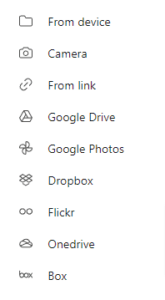
The drag-and-drop uploader is not just “choose a file.” You — and anyone filling in one of your forms — can pull files straight from any of these, without downloading them first.
Sending files and data out
Approved submissions route themselves
Once a submission is in, FileDrop can push the file to your storage and the details to your spreadsheet at the same time — automatically, on every submission.
Files land in your storage
Google Drive
Files submitted through a request page are saved to your Google Drive automatically — no downloading and re-uploading. Everything lands in an organised folder you can reach from anywhere.
Dropbox
Submitted files go straight to the Dropbox folder you choose. If your team already lives in Dropbox, everything stays in one place.
OneDrive
Submitted files go straight to the OneDrive folder you choose. If you already use OneDrive, nothing has to move twice.
Details land in your spreadsheet
Google Sheets
Every submission adds a row to a Google Sheet with the submitter’s details and file links. Good for tracking, sharing with the team, or feeding an existing workflow.
Airtable
Each submission becomes a record in your Airtable base. You map fields to columns, so it drops into whatever you already run there — a client tracker, a project pipeline, a review board.
Excelexport
Download every submission as one Excel file, formatted with headers, file links and all field responses. Handy for reporting, or anyone who prefers spreadsheets offline.
Want it conditional — only route when a status is approved, only certain rows? That is what Automations are for. See the examples.
Everything else
And Zapier for the rest
Zapier connects FileDrop to thousands of other apps. Wire any FileDrop event into a tool we don’t integrate with directly — a CRM, a project tracker, a notifier — without writing code.
For developers
API and webhooks
When you want FileDrop to plug directly into your own systems rather than living in the dashboard, the API gives you full programmatic control and webhooks push events to you the moment they happen.
⚙What the API does
Build your own workflows around file requests and PDF sharing: retrieve submissions, trigger approvals or rejections, manage forms and distribute PDFs — all from your own app or backend.
↗Webhooks push, you don’t poll
Rather than checking for updates, webhooks notify you in real time. You get pinged for events like:
- A new file-request submission arrives
- A submission is approved or rejected
- A shared PDF is viewed, downloaded, or hits its view limit
- A shared PDF expires
🔑Setup
Generate an API key from your dashboard, point a webhook at any URL you control, and add a signing secret so you can verify each payload genuinely came from FileDrop. Then the events trigger whatever comes next — a notification, a CRM update, an approval flow.
Wire FileDrop into the way you already work
Files in from anywhere, documents and data out to everywhere, and an API for whatever is left. The free plan is enough to connect your first one.