
You’ve signed a new client. The contracts are in, the team’s excited and then you spend the next week chasing logo files, digging through email threads for login credentials, and rescheduling the kickoff call because no one internally knows who’s running it.
Sound familiar? This is the reality of a broken marketing agency onboarding process — and it’s costing you more than just time.
Most agencies treat onboarding as a loose checklist: send a welcome email, ask for assets, schedule a call. But without a clear system, small delays compound, and the next thing you know, you’re three weeks in with nothing to show.
This guide introduces a 2-phase framework that fixes your marketing agency onboarding process by separating internal preparation from client-facing execution. You’ll learn where the real bottlenecks happen, how to eliminate them before they start, and how to build an onboarding workflow that gets you to execution faster.
Why Most Marketing Agency Onboarding Processes Stall
Most agencies assume onboarding is simple. You send emails, set up a call, and that’s it. But without a clear system, this is where client relationships quietly start to break down.
Here’s where onboarding typically stalls:
The sales-to-ops handoff is a mess: Sales closes the deal, but key details like what was promised, what’s in scope live in someone’s head or a buried proposal. The ops team starts half-blind, and the client ends up repeating themselves.
No one owns onboarding internally: Account managers assume project managers will handle setup. Project managers assume someone has already created the shared folder. Without clear ownership, things slip through the cracks.
Asset collection turns into a back-and-forth: You ask the client to send brand assets. They email a few logo files. A week later, you’re still missing the vector version. Every missing file delays creative work.
Platform access takes longer than expected: You need access to Google Analytics, ad accounts, and maybe their CMS, but the client doesn’t know how to add you, or they need internal approval. Work stalls while you wait.
Scope isn’t documented clearly: There’s a proposal, but no formal scope of work. Two weeks in, the client asks for something outside of scope, and you don’t have documentation to point back to.
These problems aren’t unique to your agency, they’re industry-wide. But most agencies treat them as inevitable instead of fixable.
The solution isn’t working harder. It’s restructuring your marketing agency onboarding process into two distinct phases: internal preparation and client-facing execution.
The 2-Phase Approach to Client Onboarding for Marketing Agencies
Onboarding has two distinct modes of work: what your team does internally and what you do with the client. When these get mixed, things can get messy fast.
The 2-phase approach separates these modes intentionally. Internal preparation happens first, before the client is involved. Client-facing execution comes second, only after your team is aligned and systems are ready.
When you stop treating your marketing agency onboarding process as one long to-do list and start treating it as two separate stages, bottlenecks become visible and fixable.
Before diving into each phase, here’s a high-level view of the full onboarding sequence:
Phase 1: Internal Communication
- Assign the onboarding team and define roles (Owner: Account/Project Manager)
- Review contract and align on scope (Owner: Account Manager + Sales)
- Prepare systems, folders, and templates (Owner: Project Manager)
- Internal sign-off before client contact (Owner: Account Manager)
Phase 2: Client-Facing
- Send welcome email and set expectations (Owner: Account Manager)
- Conduct kickoff call or discovery session (Owner: Account Manager + Strategist)
- Collect client assets, files, and credentials (Owner: Project Manager)
- Request access to marketing platforms (Owner: Project Manager)
- Run initial marketing audit (Owner: Strategist)
- Present strategy roadmap and get approval (Owner: Account Manager + Strategist)
- Deliver first actionable item (Owner: Delivery Team)
Use this as a reference throughout onboarding. Each step is covered in detail below.
How long should this take?
For most marketing agencies, the full onboarding process takes 2 to 4 weeks.
Your marketing agency onboarding process timeline depends on client responsiveness, complexity of the engagement, and how quickly assets and platform access are provided. Agencies with standardized systems and templates typically finish in 1-2 weeks; those rebuilding the process for every client often take 3-4 weeks.
Set expectations with the client upfront. Let them know the onboarding timeline during the kickoff call, and explain how delays on their end will push back the start of active work.
Phase 1 – The Internal Preparation (Before Client Contact)
Phase 1 is everything that happens before the client hears from your team.
This is the internal team preparation — aligning on what was sold, assigning who owns what, and preparing the systems your team will use throughout the engagement. It happens after the contract is signed but before the welcome email goes out.
Most agencies skip this phase. The kickoff call gets scheduled immediately, and the team scrambles to get organized while already engaging the client. That’s how onboarding starts on the back foot.
Here’s what to complete before any client-facing communication begins.
Assign the Onboarding Team and Define Roles
Before reaching out to the client, clarify who’s involved and what each person owns.
Most agency onboarding teams include an account manager (client relationship and communication), a project manager (timelines, tasks, and deliverables), a strategist (campaign planning and recommendations), and a creative lead (design and content execution). Not every engagement needs all four. Smaller projects might combine roles as needed, and that’s fine.
What matters is that responsibilities are clear and one person owns the onboarding process end-to-end. This is usually the account or project manager. They’re accountable for keeping onboarding on track, even if they’re not doing every task themselves.
Once roles are assigned, hold a short internal kickoff meeting. Use this to review the project scope, confirm responsibilities, and align on next steps before the client is involved. This meeting doesn’t need to be long, but it ensures everyone starts with the same context.
Review the Contract and Align on Scope Internally
Don’t let your team start onboarding based on assumptions. Before any client communication, review what was actually agreed.
Pull out the essentials: deliverables, timelines, budget, and anything explicitly excluded. If the sales team made verbal commitments or noted specific client expectations, those need to be documented too and not left in someone’s memory.
Formalize this handoff. Create a standardized briefing document that sales fills out for every new client. Include expectations, special requests, and any red flags that surfaced during the sales process. This becomes the single source of truth for the delivery team.
During this review, proactively flag potential risks like resource conflicts, unclear deliverables, tight timelines. Assign someone to monitor each risk before it becomes a bottleneck. It’s easier to solve problems now than in the middle of client-facing onboarding.
Prepare Internal Systems, Folders, and Templates
Get your infrastructure ready before the client sends a single file.
Start with a dedicated client folder using a consistent structure:
- Client Name (Parent Folder)
- 01 – Contracts & Scope
- 02 – Brand Assets
- 03 – Campaign Materials
- 04 – Reports & Analytics
- 05 – Meeting Notes
This becomes the centralized location for everything related to the client. Make sure everyone on the team knows where to find it — no files buried in personal drives or scattered across email threads.
Next, prepare your templates: an onboarding checklist, a client questionnaire, an asset request list, and a kickoff call agenda. These shouldn’t be built from scratch every time. Have them ready to customize and send.
Then set up your project management board like Asana, Trello, ClickUp, or whatever your team uses. Create tasks, assign owners, and set initial milestones before the client kickoff. This way, work can begin the moment Phase 2 starts.
If your tools allow it, automate folder creation and task generation when a new client is added. The less manual setup required, the faster you move.
Finally, document your internal SOPs for this entire phase. When everyone follows the same marketing agency onboarding process, nothing gets missed, regardless of who’s leading the engagement.
Before moving to Phase 2, confirm internal readiness.
Phase 1 is complete when roles are assigned, scope is documented, and systems are in place. The onboarding owner should verify that all internal prep is done before any client-facing communication begins.
This is the handoff point. Skipping this check is how agencies end up disorganized mid-kickoff because someone forgot to set up the project board or never reviewed the contract. A quick internal sign-off takes five minutes and prevents days of backtracking later.
Phase 2 – The Client-Facing Onboarding
Phase 2 is where you engage the client directly.
This is the client-facing work — welcome emails, kickoff calls, asset collection, platform access, and everything else that involves the client’s participation. It starts once Phase 1 is complete and your team is fully prepared.
Most marketing agency onboarding process friction happens here. Clients don’t know what to send or where to send it. Access requests sit in inboxes. Kickoff calls get rescheduled because the right people aren’t available. When agencies rush into Phase 2 without internal prep, these delays compound.
But when Phase 1 is done right, Phase 2 moves faster.
Here’s what to complete once you begin engaging the client.
Send a Welcome Email and Set Communication Expectations
The welcome email is the client’s first real interaction with your operations team. It sets the tone for how the engagement will feel.
A good welcome email does three things: introduces who the client will be working with, explains what happens next, and sets communication expectations upfront.
Here’s what to include:
- Introduce the main point of contact: Let the client know who’s leading their account and how to reach them. If multiple people are involved, clarify who handles what so the client doesn’t have to guess.
- Outline the next steps: Don’t leave them wondering what to do. Tell them exactly what’s coming — whether that’s a kickoff call, a questionnaire, or an asset request — and when to expect it.
- Set communication norms: Define how often you’ll provide updates, which channel you’ll use (email, Slack, or a client portal), and your typical response time. This avoids mismatched expectations later.
State what you need from them. Communication goes both ways. Be clear about what you’ll need from the client, like timely feedback, access to platforms, or internal approvals, and how delays on their end affect the timeline.
Keep the email short and actionable. The goal isn’t to impress them with how thorough you are — it’s to give them clarity and confidence that they’re in good hands.
Conduct a Kickoff Call or Discovery Session
The kickoff call is your first working conversation with the client. It’s where real alignment happens.
A good kickoff call confirms what was agreed during sales, fills in details your team needs to execute, and gives the client confidence that you understand their goals.
Here’s what to cover:
- Review scope and goals. Walk through deliverables, timeline, and success metrics together. Clarify anything still vague.
- Ask the right questions. Who are the internal stakeholders? What’s been tried before? Are there risks or constraints you should know about? The more context you gather now, the fewer surprises later.
- Align on communication. Confirm update frequency, preferred channels, and main points of contact on both sides.
- Let the client talk. The more they explain their goals in their own words, the clearer your direction becomes.
After the call, send a short recap email confirming what was discussed and assigning next steps to both sides.
Collect Client Assets, Files, and Credentials
Once the kickoff call is done, you need to collect everything required to start work — logos, brand guidelines, fonts, photography, copy docs, and login credentials for platforms you’ll be managing.
This is where onboarding often stalls.
Most agencies handle asset collection over email. The client sends a few files, you reply asking for what’s missing, they respond a week later with the wrong format. Large files fail to send or WeTransfer links expire. Assets end up scattered across inboxes, and someone on your team wastes time tracking everything down.
The fix isn’t sending more reminder emails, it’s removing email from the equation entirely.
Instead of asking clients to “send over” their files, give them a single, centralized place to upload everything. No logins, no attachments, no guessing what goes where. They upload once, and your team receives it instantly — already organized.
Here’s how to set that up using FileDrop.
How to Streamline Asset Collection with FileDrop
A streamlined onboarding process sets the tone for your agency-client relationship. Instead of chasing files, brand assets, and access credentials through scattered email threads, FileDrop offers a powerful Google Forms alternative that lets you collect everything through a secure, branded portal and automatically organizes it in your Drive.
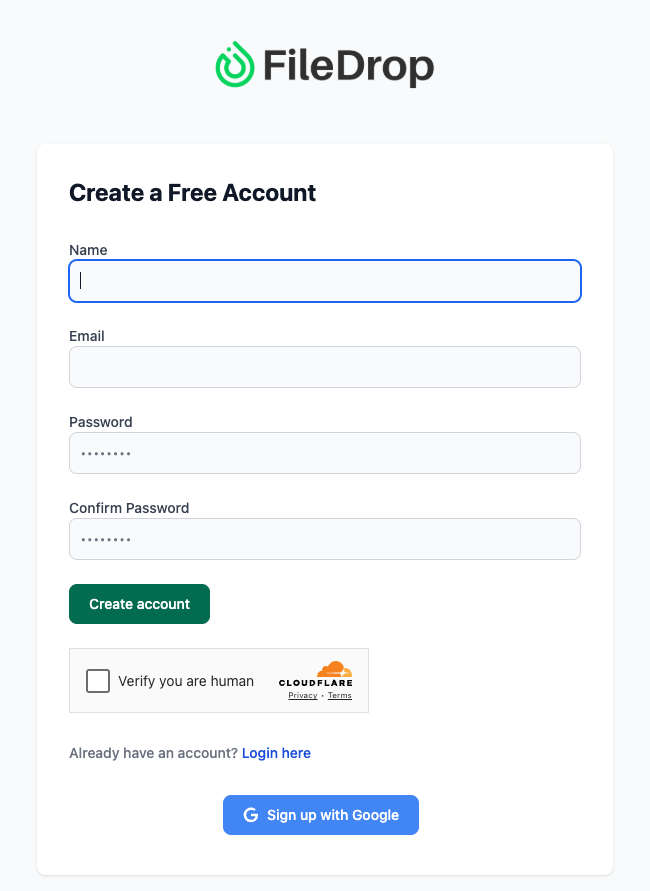
Step 1: Create Your FileDrop Account
Start by visiting https://app.getfiledrop.com/register and sign up using your agency email.
Once you activate your account, you’ll land on your FileDrop dashboard where you can create a file request page with a form, manage submissions, and connect integrations like Google Drive and Google Sheets.
Pro Tip: Use a shared agency email (like onboarding@youragency.com) so your whole team can monitor submissions in one place without forwarding links manually.
Step 2: Create and Configure your Upload Page
From your FileDrop dashboard, click File Request Page on the left-hand menu. Then click Create New Page at the top right.
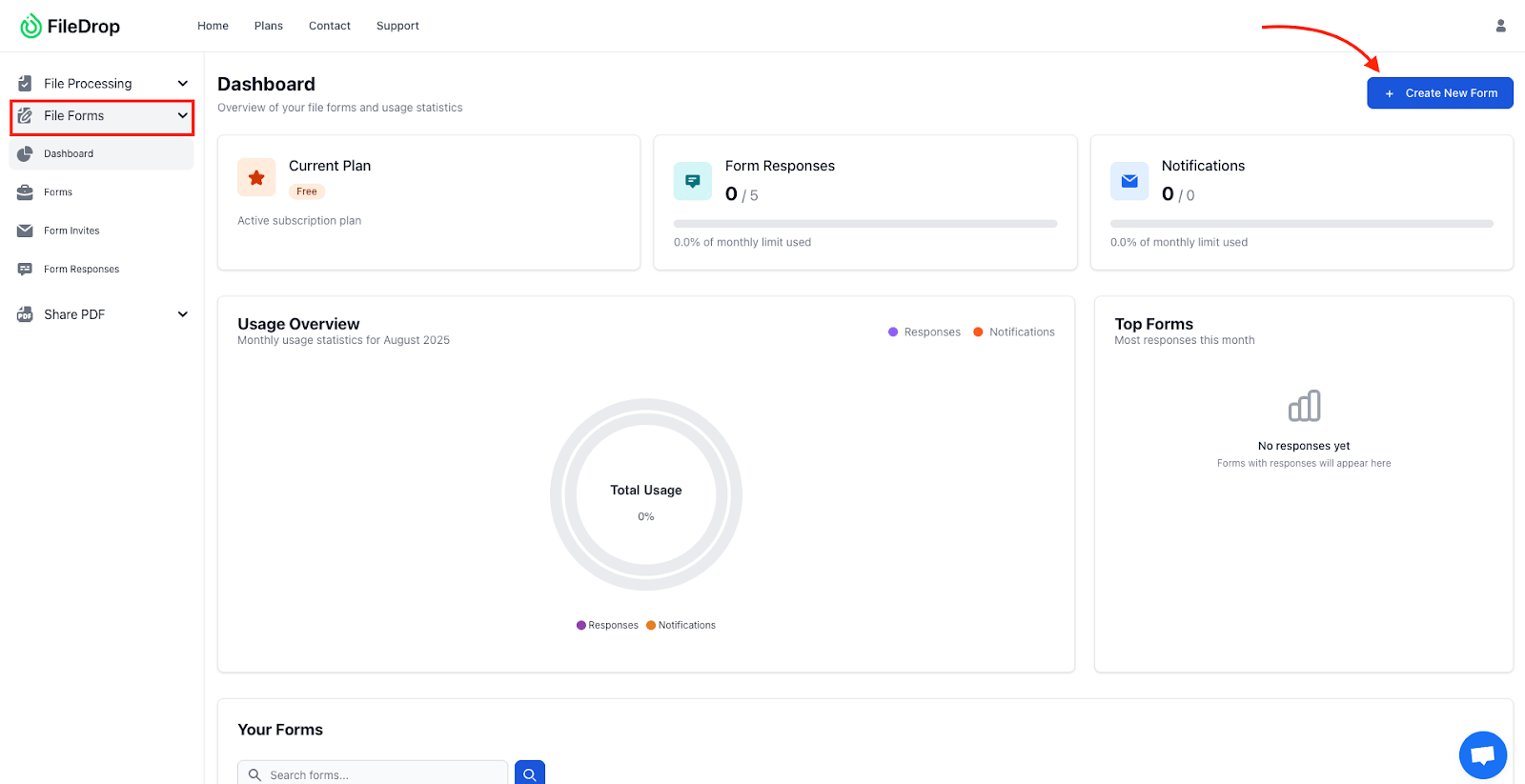
Give your page a clear internal name so your team knows exactly what it’s for. Example naming formats:
- Client Onboarding – Branding Files & Access
- New Client Asset Upload – 2025
- Client Launch Setup – File Collection
This name is for internal reference only and helps you keep pages organized as your agency scales. Next, configure your page setting.
This is where you define how your upload portal will behave and who can access it.

Inside the Page Settings section, configure:
| Setting | Recommended Setup |
| Page Name (Internal Use) | Client Onboarding Files – 2025 |
| Description/Welcome Note | “Please upload your brand assets, logos, access credentials, and onboarding documents using the form below. All files go directly to our secure Google Drive.” |
| Upload Logo | Add your agency logo so clients know they’re on your official upload page. |
| Page Passcode (Optional) | Example: @youragency.com — Only people with your agency’s email domain can access (good for internal pages). |
Tip: If the page is only for clients after contract signing, you can skip the passcode. If it’s a general intake form, enable a passcode to control access.
Step 3: Connect Google Drive for Automatic Organization
This is where automation replaces manual downloading and file sorting.
Do this once and FileDrop handles the rest:
- Scroll to Google Drive Integration inside your page setup.
- Click Connect Google Drive.
- Authorize access and select your agency’s Clients folder structure.
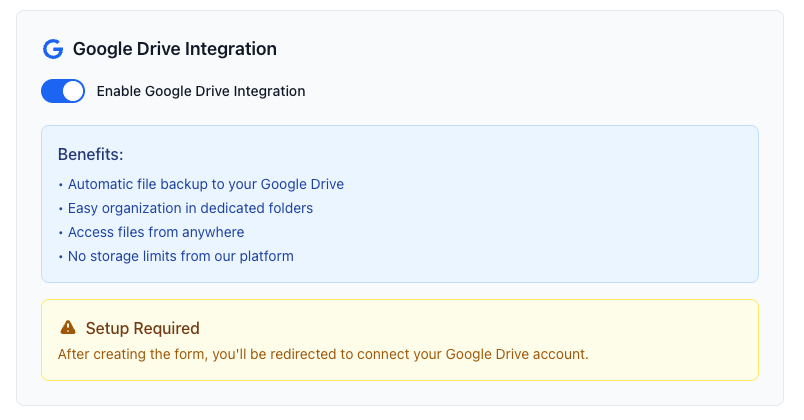
Suggested folder setup for agencies:
Google Drive
└── Clients
├── New Onboarding
├── Active Clients
├── Pending Assets
├── Brand Kits Received
Once connected, every file a client uploads will be automatically stored in the correct Drive folder, with no manual uploads or renaming.
Why this matters: Your account manager, designers, and copywriters all get instant access without hunting through Gmail threads or Slack messages.
Step 4: Add Instructions and Apply Your Agency Branding
A clean, branded page instantly improves professionalism and guides clients clearly.
Here’s what to set:
- Page Title Example: Upload Your Brand Assets & Access Credentials
- Instruction Text Example: “Please upload your logo files (SVG, PNG, PDF), brand guidelines, fonts, website logins, and any reference material here. Files are securely stored and instantly available to our team.”
- Then:
- Upload your agency logo
- Match button and header colors to your brand palette
- Branding Impact: Clients immediately feel like they are interacting with a structured onboarding system — not just sending files into a generic cloud folder.

Step 5: Share the Upload Link with Clients
Once your page is active, FileDrop generates a secure shareable link.
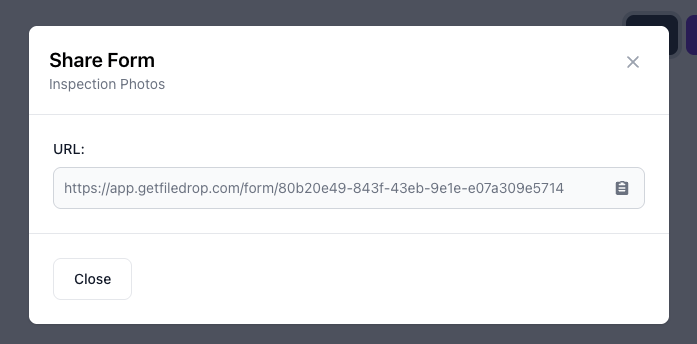
You can integrate this link directly into your onboarding process (optional):
- Include it in your welcome email after contract signing
- Embed it inside your client kickoff Notion or ClickUp dashboard
- Add it to a proposal acceptance page or onboarding checklist
- Send via email with a line like: “To begin onboarding, please upload your brand assets using this secure link:”
Best Practice: Make this link part of a standardized onboarding template so every new client follows the same process.
Step 6: Optional – Track Onboarding Files with Google Sheets
If you want a live dashboard of who has submitted what, turn on Google Sheets Sync.
- Click the Google Sheets icon next to your page in FileDrop
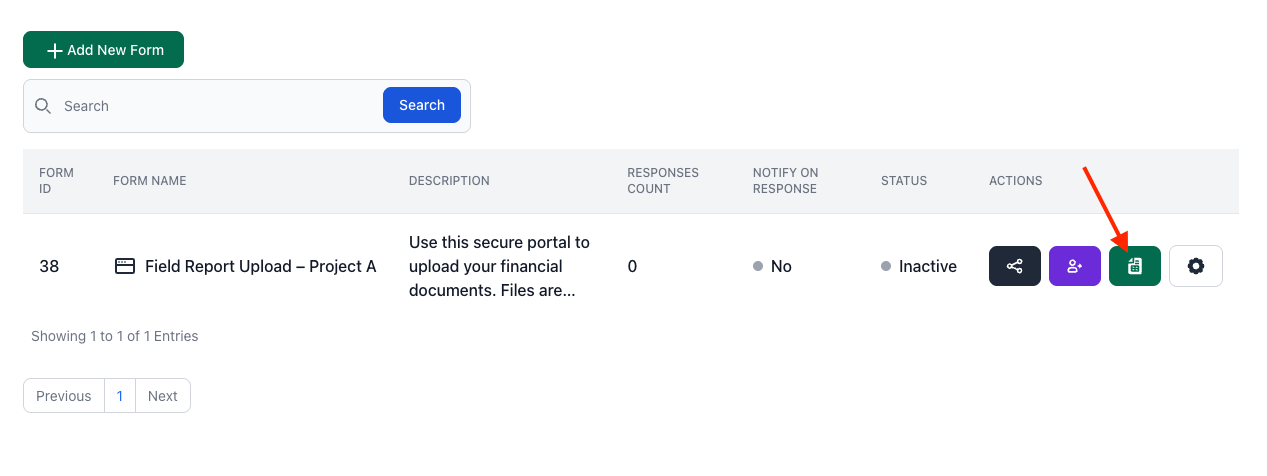
- FileDrop will auto-generate a spreadsheet that logs:
- Client Name
- Upload Date
- Files Submitted
- Missing Assets
- Direct Google Drive Link
This is ideal for project managers to track onboarding progress at a glance and follow up on missing brand assets without manually checking folders.
Request Access to Marketing Platforms and Tools
Before your team can do any real work, you’ll need access to the client’s marketing platforms — Google Analytics, Google Ads, Meta Ads, Search Console, their CMS, and possibly more.
This step seems straightforward in theory, but often causes delays in practice. Clients don’t always know how to grant access, or they need to loop in their internal IT team for approval. Meanwhile, your team waits.
Here’s how to keep this moving:
- Send clear instructions upfront: Don’t assume clients know how to add you to their platforms. Include a short guide or Loom video in your welcome email showing exactly how to grant access for each tool you need. The easier you make it, the faster it happens.
- Never ask for passwords. Use platform-native permission: Every major platform (Google, Meta, HubSpot, etc.) has built-in user access controls. Request the appropriate permission level (usually Editor or Analyst) through the platform itself. It’s more secure and avoids awkward credential sharing.
- Consider using an access request tool: Access request tools let clients grant access to multiple platforms through a single link. If platform access is a recurring bottleneck for your agency, this can save significant time.
- Follow up quickly: If access isn’t granted within 48 hours, send a polite reminder. Delays here push back everything else.
Once access is confirmed, document it in your project tracker so your team knows exactly which platforms are ready to use.
Run an Initial Marketing Audit
Before you start building a strategy, you need to understand where the client currently stands.
An initial audit isn’t a full-scale analysis — it’s a baseline review of what’s working, what’s not, and where the gaps are. Skipping this step leads to redundant work or recommendations that ignore what the client has already tried.
The audit serves two purposes. First, it gives your team the context needed to make informed recommendations. Second, it builds credibility with the client. When you surface insights they hadn’t noticed or confirm suspicions they already had, you prove you’ve done your homework.
This is also where you identify quick wins, like small fixes or optimizations you can act on immediately. Early wins build momentum and trust before the bigger strategy work begins.
Once the audit is complete, summarize your findings and share them with the client. Highlight what’s working, what needs attention, and what opportunities you’ve identified. This becomes the foundation for everything that follows.
Present the Strategy Roadmap and Get Client Approval
Once your audit is complete, translate your findings into a clear plan that the client can approve.
A strategy roadmap turns abstract ideas into a tangible timeline. It shows what you’ll deliver, when you’ll deliver it, and how each initiative ties back to the client’s goals. Without this step, you risk starting execution with misaligned expectations — which leads to scope creep, confusion, and frustration on both sides.
Keep the roadmap high-level. Focus on key initiatives and milestones, not granular tasks. A simple 30/60/90-day view is often enough during onboarding. You can get more detailed once the engagement is underway.
When presenting, tie each initiative directly to the goals discussed during discovery. Show the client how your plan addresses their priorities — not just what you’re doing, but why it matters.
Then, get sign-off. This doesn’t need to be a formal contract amendment, but it should be a documented agreement, whether that’s an email confirmation, a signed scope summary, or approval in your project management tool. This protects both sides and creates accountability before work begins.
A roadmap isn’t just a planning tool. It’s a trust-building moment that shows the client you’ve thought through the engagement and have a clear path forward.
Deliver the First Actionable Item
Onboarding isn’t complete until the client sees tangible progress.
Before transitioning to ongoing execution, deliver the first actionable item — a content calendar, campaign brief, initial audit report, or draft timeline. This signals that onboarding is officially over and real work has begun.
The first deliverable doesn’t need to be polished or final. It just needs to demonstrate momentum. Clients who see early output feel confident the engagement is moving forward. Clients who sit through weeks of onboarding with nothing to show for it start to wonder what they’re paying for.
Use this moment to reinforce alignment. Walk the client through what you’ve delivered, confirm it matches their expectations, and outline what comes next. This creates a clean handoff from onboarding into execution — and sets the tone for how the rest of the engagement will run.
Post-Onboarding: Setting Up for Long-Term Client Success
Completing Phase 1 and Phase 2 of your marketing agency onboarding process gets your client onboarded — but onboarding alone doesn’t guarantee a successful engagement.
The first few weeks set the tone. What comes next determines whether the relationship lasts. Agencies that stop at onboarding often find themselves in reactive mode
Here’s how to set up for long-term success.
Establish a Reporting Cadence and Performance Tracking
Don’t wait for clients to ask how things are going. Set a reporting cadence from the start so they always know when updates are coming.
Most agencies report monthly, but the right cadence depends on the client. The key is matching your reporting rhythm to how quickly decisions need to be made.
Define what you’ll report on early — traffic, leads, conversions, campaign performance, or whatever KPIs were agreed during onboarding. Use dashboards or automated reports to reduce manual work, but don’t just send data dumps. Every report should answer three questions: what happened, why it happened, and what’s next.
When clients know when to expect updates, they stop asking for them. That alone reduces back-and-forth and builds confidence that you’re on top of things.
Create Self-Service Resources for Clients
Clients will have questions after onboarding ends. The goal is to answer most of them before they ever reach your inbox.
Build a simple resource hub. This could be a shared folder, a Notion page, or a client portal. Include the essentials: how to submit feedback, how revisions work, who to contact for what, and answers to the questions you get asked repeatedly.
The best self-service resources are context-aware. FAQs about billing should live near the invoice. Guidelines for submitting files should appear where clients actually upload files. When answers are easy to find, clients stop emailing for things they could find themselves.
This isn’t about reducing communication; it’s about making communication more efficient. Your team spends less time on repetitive questions. Clients get answers faster. Everyone wins.
Gather Feedback and Improve Your Onboarding Process
A static onboarding checklist breaks down over time. Clients join with different expectations, learning speeds, and blind spots. What worked six months ago might be causing friction today.
Build a feedback loop into your process. After onboarding wraps, ask the client what worked and what didn’t. A short survey or a five-minute conversation during your first check-in will do. What was confusing? What took longer than expected? What would have helped?
The key is acting on what you learn. Every piece of feedback should result in a visible change whether that’s updating a template, rewriting instructions, or adjusting the sequence of steps. Document what you change and why.
Over time, your marketing agency onboarding process becomes a competitive advantage. Each cycle gets tighter, faster, and smoother than the last. That’s how good agencies turn a repeatable process into a scalable one.
Final Thoughts
The first few weeks of a client relationship tell them everything they need to know about working with you. A scattered onboarding experience signals disorganization. A smooth one signals competence, professionalism, and reliability.
That first impression compounds. Clients who feel confident early are easier to work with, more forgiving when challenges arise, and far more likely to stick around.
Agencies that master onboarding don’t just retain more clients — they attract better ones. Referrals come from clients who feel taken care of.
Start with one improvement. Fix the bottleneck that’s been slowing you down the most. Then fix the next one. Each iteration gets you closer to a marketing agency onboarding process that wins clients for the long term.
Ready to eliminate your biggest onboarding bottleneck?
Asset collection doesn’t have to be a week-long email chase. Create a free FileDrop document collection page and start collecting client files in minutes — no logins required for your clients.
Key Takeaways
✓ Separate onboarding into two phases: internal prep (before client contact) and client-facing execution
✓ Assign one owner to the onboarding process — accountability prevents things from slipping through cracks
✓ Use a centralized file collection tool to eliminate the asset collection bottleneck
✓ Deliver a first actionable item before transitioning to execution — clients need to see momentum
Marketing Agency Onboarding Process FAQs
How long should the marketing agency onboarding process take?
Most agencies complete client onboarding within 1-2 weeks, depending on how quickly clients provide assets, grant platform access, and respond to requests. The key is maintaining momentum — clear instructions, timely follow-ups, and systems that eliminate unnecessary back-and-forth.
What’s the biggest bottleneck in client onboarding?
Asset collection. Agencies ask clients to send files over email, then spend days chasing missing logos, brand guidelines, and credentials scattered across multiple threads. Using a centralized file request tool like FileDrop eliminates this friction entirely.
Can clients upload branding files and documents without creating an account?
Yes. With FileDrop’s File Request Pages your clients don’t need to register or log in. Just send them the secure link and they can start uploading files immediately, making onboarding faster and more convenient.
You can enable a page passcode, such as restricting access to users with a specific email domain (e.g., @clientcompany.com). This ensures only verified clients can submit onboarding materials.
Will my team get notified when a new client uploads files?
Yes. You can enable email notifications so that your team receives an alert instantly every time new onboarding files or briefs are uploaded. This helps your account managers respond quickly and keeps the process moving.
Absolutely. FileDrop supports Google Drive integration, which means every uploaded file is automatically backed up and organized into your designated Drive folder—no manual downloading or sorting required.