
Send a PDF as a link you still control
An email attachment is gone the second you hit send. A FileDrop link is not: set a password, an expiry date, a view limit, turn downloads off, stamp a watermark on every page — and change your mind afterwards.
- Views tracked
- Works in any browser
- QR code included
- Custom domain
yourbrand.com/s/q3-proposal- Password on
- Expires in 7 days
- 3 of 6 views left
- Download off
- Watermarked
- Email verified
- Search indexing off
The other end
This is what your recipient opens
No download, no plug-in, no account. The PDF renders in the browser on a page carrying your logo — or your own domain — and every one of your rules is already in force before the first page appears.


Who sends these
Trusted where the document matters
Legal teams, agencies, real estate professionals and finance departments — anyone who needs to know a document arrived, and needs it to stop being available later.
For accountants
“Send tax returns and contracts securely.”
For agencies
“Share proposals and reports professionally.”
For HR
“Distribute onboarding documents.”
For real estate
“Share beautiful brochures with custom links and tracking.”
Four steps
How PDF hosting works
Upload takes about ten seconds. Everything after that is you deciding who gets to see it.

Upload it
Drag the PDF into the upload area — or pull it from your phone, Dropbox or OneDrive — choose your settings, and the link is generated for you.

Share the link
Copy it, embed it on a site, or print the QR code that comes with every file.

Or send invites
Invite named people by email instead. Each recipient gets their own secure link, so you can see who opened what.
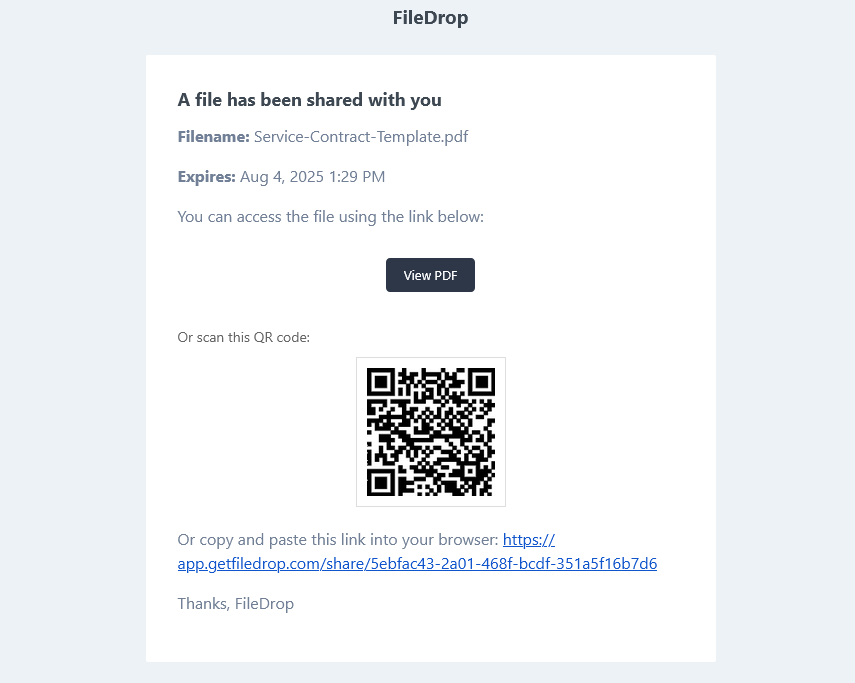
They open it
The email carries the link and a QR code, so a document opened on a laptop can be moved to a phone with a scan.
Every paid plan
The controls you put on a link
These are the settings that make a hosted link different from an attachment. Turn on as few or as many as the document deserves.
- Expiration date
- Views limit
- Password protection
- Download & printing off
- Search indexing off
- Email verification
- Dynamic watermarks


Analytics
Know whether they actually read it
Unique visitors, total views, country, and how interest moved day by day. The difference between “I sent the proposal” and “they opened it twice on Tuesday and once again this morning” is the difference between guessing and following up at the right moment.
Housekeeping
Rename the link, swap the file
Edit the URL into something you would be happy to read out loud, and save. Found a typo on page four after sending it to forty people? Replace the file behind the link — the URL, and everyone holding it, stays exactly the same.


Watermarks
Stamp every page with who is looking at it
Turn on watermarking and each page carries the viewer’s IP, the date and time, your own custom text — a company or offer name — and, once someone has verified themselves with a PIN sent to their inbox, their email address.
Colour, position, opacity and size are all yours to set. More on dynamic watermarks.
Flipbook mode
Or hand them something that turns pages
Switch a link into flipbook mode and the PDF becomes an interactive publication with real page-turn animation. Right for catalogues, magazines, portfolios and annual reports — anything where the reading experience is part of the pitch. See the flipbook maker.

Everything included
Key features for professional PDF hosting
01Getting it up there
- Drag and drop uploadFrom your PC, phone, Dropbox or OneDrive. Instant, and built for people in a hurry.
- Multiple files per linkPut a proposal and its appendices under one link, so recipients get the whole package at once.
- Flipbook modePage-turn animation for catalogues, magazines, portfolios and reports.
02Keeping control of it
- Password protectionRestrict a link to the people you gave the password to.
- Expiration datesDeactivate automatically on a date, or after a period — so old versions stop circulating.
- View limitsSingle-use, five views, ten — whatever you set. Past the limit the file simply stops opening.
- Downloads and printing offKeep a document view-only rather than letting it be saved and forwarded.
- Dynamic watermarksEmail, custom text, IP address, date and time, stamped on every page.
- Encrypted hostingEncrypted in transit and end to end, through upload, storage and sharing.
03Getting it to people
- Automatic QR codesEvery hosted PDF generates one — for print, business cards, property signage.
- Mobile-friendly viewingOptimised for phones and tablets, and the QR code moves a document between devices.
- Email invitesSend from inside FileDrop, with a secure link, a QR code and your own message.
- Embed anywhereDrop the PDF straight into any website once the link exists.
04Making it yours
- Your logo on the pagePersonalise the page your link opens on.
- Custom domainsPoint your own domain at it and every link updates automatically.
Side by side
Compare PDF sharing solutions
Dropbox and Drive are storage with a share button attached. The rows below are the ones where that difference shows.
| Feature | FileDrop PDF Link | Dropbox | Google Drive | WeTransfer | Issuu | tiiny.host |
|---|---|---|---|---|---|---|
| Multi-file packages in one link | ✓ | — | — | ✓ | — | — |
| Dynamic watermarking (email, IP, timestamp) | ✓ | — | — | — | — | — |
| Email verification gate | ✓ | — | — | — | — | ✓ |
| Flipbook / page-turn viewer | ✓ | — | — | — | ✓ | — |
| Expiry by date + view count combined | ✓ | — | — | ✓date only | — | — |
| Per-view analytics with daily trends | ✓ | — | — | — | ✓paid | ✓aggregate |
| Embeddable with domain whitelist | ✓ | — | — | — | ✓ | — |
| Custom subdomain | ✓ | — | — | — | — | ✓ |
| Custom domain | ✓ | — | — | — | ✓paid | ✓paid |
| QR code generation | ✓ | — | — | — | — | ✓ |
| Password protection | ✓ | ✓paid | — | ✓ | ✓paid | ✓ |
| Download toggle (view-only mode) | ✓ | ✓ | ✓ | — | ✓paid | — |
| SEO indexing control | ✓ | — | — | — | ✓ | — |
| Subuser / team access | ✓ | ✓ | ✓Workspace | — | ✓paid | ✓ |
| Webhooks | ✓ | ✓paid | — | — | — | — |
Competitor capabilities as publicly documented at the time of writing. “paid” means the feature exists but on a higher tier.
Compliance
Certified for your security
FileDrop is GDPR, CCPA and nFADP compliant, and TLS encryption means your documents carry an added layer of protection in transit.
Industry-leading encryption and data protection at every step.
Compliant with EU and international data protection standards.
Built to last, to the highest standards of quality and safety.
We are a message away if something needs sorting out.
Seven situations
What people actually use it for
Each one is the same move: pick the constraints the document needs, then send the link.
Business & professional
- Challenge
- Large proposals and contracts bounce off email size limits, and once they are sent you cannot control access.
- Solution
- Host the quarterly proposal with a seven-day expiry and a password. When the review window closes, the link deactivates and your pricing stops circulating.
- Password
- Expires in 7 days
Legal & compliance
- Challenge
- Sending case files by email puts attorney-client privilege at risk and leaves copies everywhere.
- Solution
- Share a settlement agreement with a three-view limit — one for your client, one for opposing counsel, one for the mediator. After the third, it closes.
- 3 view limit
- Download off
Education & training
- Challenge
- Course material forwarded beyond enrolled students, and old versions that never die.
- Solution
- Upload the syllabus and set it to expire on the last day of term. When the course ends, access ends with it.
- Expires on a date
Startups & sales
- Challenge
- Share pitch decks and sales presentation, track who view it .
- Solution
- Send the pitch deck or the presentation securely, track views, opens and more.
- Email invite
- QR code
- Expires in 30 days
Creative & marketing
- Challenge
- Portfolio PDFs are too big to email, and you want a say in how prospects see your work.
- Solution
- A portfolio link per prospective client, each with its own password. You can see who has looked, and view limits stop it being passed around.
- Password per client
- View limit
- Analytics
Real estate & property
- Challenge
- Property packets are too large for email and printing them is expensive.
- Solution
- Upload the listing and put its QR code on the For Sale sign. Buyers scan and get floor plans, disclosures and photos on their phone straight away.
- QR code
- Mobile viewing
Consulting & professional services
- Challenge
- Deliverables get forwarded to competitors, or opened long after the engagement ended.
- Solution
- Host the strategic report with downloads disabled. Clients can read it online; they cannot save it or forward it on.
- Download off
- View-only
Frequently asked questions
What is PDF hosting?
A service that stores your PDF on secure servers and gives you a shareable link. Unlike an email attachment, a hosted PDF opens in any browser without being downloaded, and you keep control through passwords, expiry dates and view limits.
What is FileDrop PDF link sharing?
Secure hosting built specifically for sharing PDFs. Drag a file in, choose how it can be accessed, and hand out the link.
How do I upload a PDF?
Drag it into the upload area, or use the button to pick a file from your PC, phone, Dropbox or OneDrive. Set a password, an expiry and a view limit if you want them, then upload — the link comes back in about ten seconds.
What security features are available?
- Password protection for sensitive documents
- View limits — cap how many times a file can be opened
- Expiration dates — access ends automatically
- Download and printing off — keep it view-only
- Dynamic watermarks — stamp each page with who is viewing
- Encryption in transit and end to end
Is there a file size limit?
Yes, and it depends on your plan — from 4 MB per PDF on the free plan up to 100 MB on Max. The plan table above has the exact figures for file size, storage and file count.
How does email sharing work?
Send invites from inside FileDrop. Each recipient gets an email containing a direct link to the PDF, an automatic QR code for opening it on a phone, and your instructions.
Are the links mobile friendly?
Yes. Every hosted PDF is optimised for phones and tablets, and the QR code makes it easy to move a document from one device to another.
Can I track who views my PDFs?
Yes. The dashboard shows unique visitors, total views and country, and you can cap the number of views per file.
What happens when a file expires or hits its view limit?
It stops being available to recipients, automatically. Nothing sensitive sits around indefinitely because somebody forgot.
What are the pricing tiers?
Stop sending attachments you cannot take back
Upload a PDF, set the rules it needs, and send a link instead. The free plan is enough to see whether it changes how you work.