


Here are the latest updates from FileDrop.
Better form fields design for Forms
We made a few small design changes that enhances the experience of creating new fields for the FileDrop Forms.

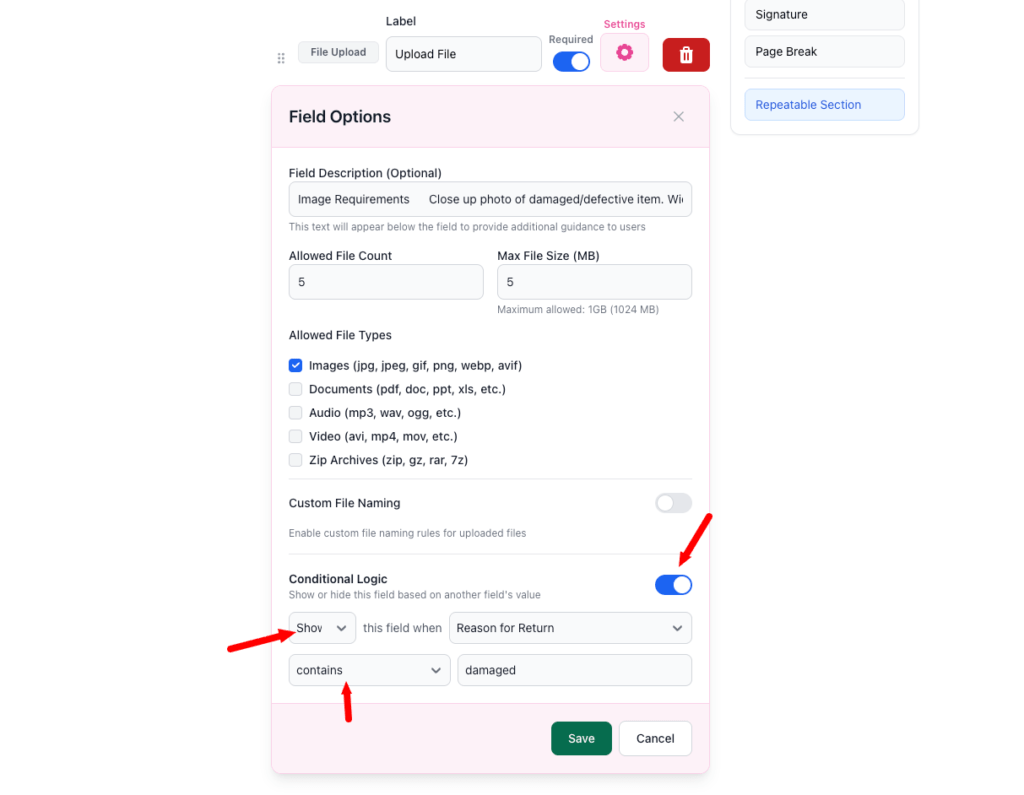
Conditional fields
Users can now display fields based on the other fields data, multiple options are available.
Localization
Pages now can be localized in over 30 languages for the file uploaders, but also the buttons are now editable.

Mobile update for instructions
Small update to display the Page instructions at the top not when clicking the burger menu.
Autosave for Forms
We had an issue where users were trying to upload documents and not all were available. A user would add one document now and the other in 20 minutes, that would make the session expire, and they would need to take it from the start.
Now users have up to 24 hours to fill in the form and the data is autosaved.
Invites updates
Users have more options when inviting users to submit documents and data from the invites panel.
Storage for PDF Files and Forms files
Each plan now displays the storage they are getting for these features.
We added in the features tables for PDF Hosting and the File Request Pages to display the available storage for the plans available.
—
There were a few other small updates and the usual small bug fixes under the hood as well.
This update was almost entirely created from feedback from our users. If you want a certain feature, please contact us.
Have an amazing and productive week.
The Bottom Line:
One keeps you awake. The other gets work done.
A month of coffee: $80
A month of FileDrop: $19
Why not have both?

