

In the legal industry, handling sensitive documents with utmost care isn’t just a best practice — it’s a legal and ethical requirement. Yet many law firms still rely on email to collect contracts, affidavits, IDs, discovery materials, and more. This method is not only outdated, but also insecure, disorganized, and inefficient.
Thankfully, there’s a better way.
In this post, we’ll walk through how your law firm can use FileDrop to securely collect legal documents from clients — without relying on email, client portals, or complicated login systems. This is a vital improvement for any law firm looking to modernize its client intake process.
Why Email Is Not Secure for Legal File Collection
Email might be convenient, but it falls short in every area that matters when it comes to handling confidential legal information.
- Lacks encryption: Standard emails aren’t end-to-end encrypted, and even secure providers can’t protect messages once they’re downloaded or forwarded. If a client’s inbox is hacked or a message is intercepted, sensitive files — such as IDs, affidavits, or evidence — could be exposed. This can violate privacy laws and breach client trust.
- No audit trail: Email lacks built-in logging or tracking. There’s no automatic record of who accessed what file and when. This makes it difficult for law firms to verify timelines, ensure compliance, or produce evidence in case of audits or disputes.
- Attachment size limits: Most email platforms limit file attachments to 25MB. This prevents the transfer of large files like scanned case bundles, video evidence, or detailed exhibits. Workarounds — such as sending multiple emails or using compression — are inefficient and error-prone.
- Disorganized delivery: Email attachments arrive sporadically and without context. Legal staff must manually sort, rename, and store files, which is both time-consuming and risky. Misfiled or lost documents can delay cases and frustrate clients.
- Risk of human error: It’s alarmingly easy to send documents to the wrong person. A single typo in an email address can result in a serious data breach with legal and ethical implications.
The result? Wasted time, client confusion, and serious compliance risks that modern law firms can’t afford to overlook.
Introducing FileDrop: A Secure, Simple Way to Collect Legal Documents
FileDrop’s document collection feature allows law firms to set up secure, branded upload portals in minutes. Clients simply drag and drop their files — no login required. This gives legal teams a modern and professional way to collect documents from clients while maintaining organization and security.
Here’s what makes FileDrop uniquely effective for the legal sector:
- Upload links with expiration and password protection: Control exactly who can upload files and when. This minimizes unauthorized access and creates a stronger chain of custody for every document received.
- Direct-to-Google Drive storage: Files are saved automatically into pre-defined folders in your Google Drive. You can configure each form to route documents by case, matter type, or client name — eliminating the need for manual sorting.
- Customizable form fields: Collect structured information alongside each file upload. Add fields such as “Client Full Name,” “Case Number,” or “Document Type” to simplify categorization and support your broader client intake process.
- Real-time notifications: Receive email alerts instantly when a client submits documents. This helps your legal team stay responsive, update case files faster, and keep clients informed of progress.
- Google Sheets metadata logging: Automatically record each upload event in a connected Google Sheet. You’ll have a running log of submission times, file names, client information, and associated cases — ideal for audits, compliance tracking, or project management.
- Branding and customization: Maintain a professional, firm-branded experience. Add your logo, custom instructions, and a personalized message to your File Form so clients feel confident and secure when uploading sensitive information.
With FileDrop, law firms can standardize how they collect legal documents across all departments and practice areas. Whether it’s litigation, corporate, family law, or immigration, File Forms ensure every document intake is secure, traceable, and easy for clients to complete — even from a smartphone.
Most importantly, this modernizes and simplifies your entire client intake process, reducing friction from the very first interaction and helping your firm stand out as tech-forward and client-friendly.
Step-by-Step: How to Set Up Your First Legal File Form
Ready to modernize how you collect legal documents from clients? Here’s how to set up your first FileDrop’s document collection software tailored for your law firm’s intake process:
Step 1: Create an Account
Go to getfiledrop.com and sign up for a free account using your Google Workspace credentials. This will allow seamless integration with your Google Drive for secure file storage.

Setup Tip: Many legal teams create a dedicated account like intake@firmname.com or documents@lawoffice.com so all case uploads are centralized rather than tied to one attorney’s email.
Step 2: Create a new document collection page
After logging in, navigate to the “create” button and select “New Page.”

Step 3: Create a New File Form
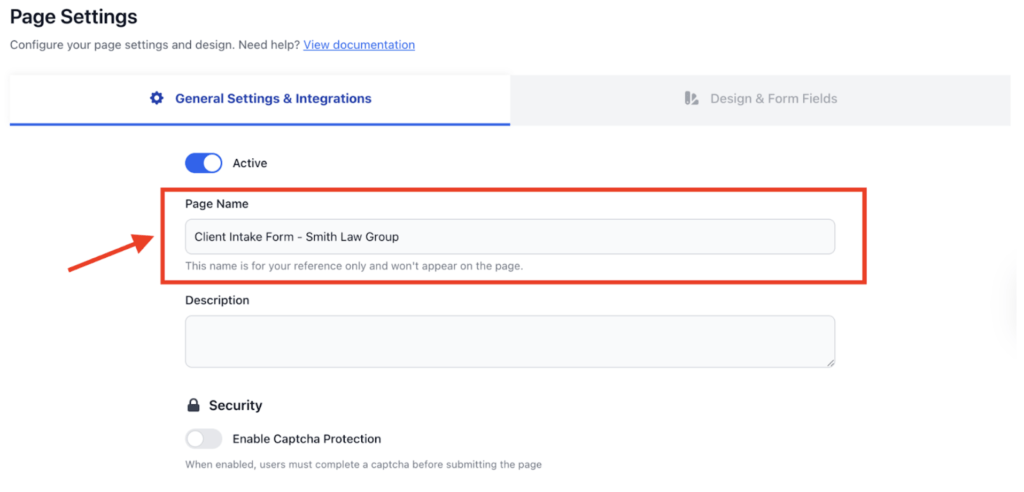
In the Page Creation page, under General Settings & Integration, give your form a clear name. Examples:
- “Client Intake – Smith Law Group”
- “Discovery Evidence Upload – [Case Name]”
- “Family Law Document Intake – Johnson & Partners”
- “Immigration Case Documents – Secure Portal”
Step 4: Activate Google Drive Integration
Enable Google Drive Integration where you want client-uploaded files to be saved. You can also enable automatic subfolder creation based on client names or case numbers to keep everything neatly organized.

Step 5: Customize Form name and description
In the Design & Form Fields tab, write a clear client-facing Page title and Page Frontend text. These two fields are essential for setting a professional tone and guiding your client through the process.

Step 6: Customize form fields and add your branding colors
Add any fields you want clients to complete when uploading files. Common fields for law firms include:
- Full Name
- Email Address
- Case Number or Matter Reference
- Document Description or Type
- Optional Instructions or Questions
This information helps you track and file submissions more efficiently.
You can also customize the form to reflect your law firm’s branding. Upload your logo, adjust color schemes, and write a short welcome message to guide clients through the upload process. A professional look inspires trust and confidence in your firm’s security practices.

Step 7: Enable Notifications
Navigate back to the General Settings & Integrations Tab and turn on email notifications. Receiving instant alerts every time a client submits a file ensures your legal team can stay responsive and maintain real-time awareness of document delivery.
To customize who receives these alerts:
- Default Notification: Leaving the email field blank will notify only the account owner.
- Team Notifications: To distribute responsibility or notify specific case teams, you can add up to 5 individual email addresses. This flexibility ensures relevant attorneys, paralegals, and support staff receive alerts simultaneously, streamlining your workflow and case updates.

Step 8: Set Access Controls
Apply additional security settings such as:
- Captcha Protection
- Page Passcode
- Portal Mode
These settings ensure documents are handled securely and reduce risk.

Once your form is ready, copy the secure upload URL and share it with clients via:
- SMS or encrypted messenger
- Your firm’s secure client portal
- A link embedded in onboarding emails or intake instructions
- A QR code for in-office document submission
Clients can access the form from any device — desktop, tablet, or mobile — and upload files with just a few clicks.

Clients can access the form from any device — desktop, tablet, or mobile — and upload files with just a few clicks, even from a smartphone during a consultation or at a deposition.
Bonus Feature: Log Uploads in a Google Sheet Automatically
Want an organized view of which clients submitted which files and when?
FileDrop allows you to connect your File Form to a Google Sheet. Each submission is automatically recorded with:
- Client name
- Submission time and date
- File names and types
- Case number or custom metadata fields
How to Enable Google Sheets Export
- Publish your document collection page first
- Click the ‘Edit Form’ button
- Under the ‘General Settings and Integrations’ tab, scroll down to the “Export to Google Sheets” section
- Click the ‘Export to Google Sheets’ button, then follow the authentication instructions

This log is helpful for compliance reviews, internal reporting, or simply keeping track of active cases. It also enhances visibility into your client intake process and provides a defensible audit trail for litigation or regulatory review.
Real Examples: How Different Practice Areas Use FileDrop
FileDrop works across the full spectrum of legal practice. Here’s how different firms might use it:
Personal Injury & Tort Law
Your firm is representing a client in a personal injury case. You need photos from the scene, scanned medical reports, and witness contact details. Instead of asking the client to email all this, you send them a FileDrop link like: files.yourwebsite.com/f/a3ij812da8udsikmn/
The client accesses the upload link on their phone or computer, drags and drops the required documents into the upload form, fills in any fields you’ve included (such as case number or their full name), and submits. Once submitted, the files are saved into a specific folder in your connected Google Drive. You receive an email notification immediately, and the file upload event is optionally logged in a connected Google Sheet for auditing and tracking purposes.
No bouncing emails, no lost attachments, and everything is secure, timestamped, and centralized.
Family Law
Family law intake requires custody agreements, financial disclosures, and sensitive personal documents. A branded FileDrop portal titled “Family Law Document Intake – [Firm Name]” guides clients through the process with clear instructions. The form collects the client name, matter type (custody, divorce, support), and any relevant case numbers, keeping everything organized and reducing follow-up emails about missing documents.
Corporate Litigation & Discovery
Litigation firms handling large-scale discovery can create a dedicated portal: “Discovery File Upload – [Case Name].” Clients (or co-counsel) upload discovery batches, exhibits, and evidence through the branded portal. FileDrop automatically creates separate folders for each submission, maintaining clear audit trails and timestamps—essential for defending chain of custody in complex litigation.
Immigration
Immigration cases involve extensive documentation: passports, visas, employment letters, bank statements, and more. A FileDrop portal eliminates the back-and-forth of “did you forget anything?” by collecting required fields upfront and organizing all materials in one place, ready for case preparation.
How One Litigation Firm Eliminated Email-Based Discovery Chaos
A mid-size litigation firm was drowning in email-based discovery. Large evidence files arrived via email, WeTransfer links (which expired), and sporadic attachments. Assistants spent hours downloading, renaming, and filing documents. Files got lost. Deadlines slipped. Clients had to be chased for missing exhibits.
After switching to a branded FileDrop discovery portal:
- Each discovery batch was uploaded through a professional, firm-branded portal
- Folders were automatically created and labeled per submission, eliminating manual file organization
- Form fields ensured clients included case references and document type, so no materials arrived unlabeled
- The firm no longer spent time chasing clients for missing information or misfiled evidence
- All materials were stored securely in their case management system, with clear timestamps for litigation support
The result: fewer follow-up emails, faster document processing, and a more professional client experience that extended from first contact through case resolution.
Frequently Asked Questions
Do clients need to create an account to upload files?
No. They simply click the link, upload, and submit — no login or technical setup required.
Can we create multiple upload portals for different legal teams or case types?
Yes. Many firms create a dedicated file upload portal for new client intake, discovery, contract drafts, court documents, and other case types. This keeps workflows organized and ensures paralegals and attorneys can track submissions clearly.
Is the portal encrypted for legal compliance?
Yes. All file submissions use secure encrypted transfer and are stored within your controlled environment (Google Drive), not on third-party servers.
Can we track submission timestamps for evidence logging?
Yes. Each upload is timestamped, which is essential during case audits, discovery timelines, and chain of custody documentation for litigation.
Can we restrict access to the upload page?
Yes. You can add password protection to any portal, ensuring only authorized clients or parties can submit files.
How does FileDrop help with attorney-client confidentiality?
Encrypted transfers, controlled storage in your own Google Drive, and timestamped logs help your firm meet confidentiality obligations. Files stay within your firm’s environment and are not exposed through email threads, reducing the risk of interception or misdirection.
Final Thoughts
Email was never designed for secure document transfer — especially not in high-stakes legal workflows. FileDrop empowers law firms to collect and organize legal files quickly, professionally, and in compliance with privacy standards.
If your team is tired of lost attachments, disorganized inboxes, scattered email threads, operational burden on paralegals, or compliance worries, it’s time to switch to File Forms — your new standard for secure legal file intake and a more streamlined client intake process.
Start today by creating your first secure form at getfiledrop.com and discover a more modern, compliant way to collect documents from clients while building trust from the very first interaction.
The Bottom Line:
One keeps you awake. The other gets work done.
A month of coffee: $80
A month of FileDrop: $19
Why not have both?


