

Managing homework can quickly become stressful, especially when assignments pile up across different subjects. If you’re juggling schoolwork and want to stay organized, a homework tracker in Google Sheets can make things a whole lot easier. It’s simple, flexible, and totally free.
Why Should You Have a Homework Tracker
A homework tracker helps you stay on top of deadlines, avoid last-minute stress, and manage your time better.
Instead of flipping through planners or scrolling through messages, you’ll have a clear view of what’s due and when. Plus, tracking your progress feels pretty rewarding when you start checking things off.
Step 1: Open a Blank Google Sheet
Go to Google Sheets, click on Blank, and rename your sheet something like “Homework Tracker.”

Step 2: Set Up Your Columns
Use the first row to label your tracker. Here’s a simple setup:
- Date
- Subject
- Teacher
- Assignment
- Due Date
- Status (Not Started / In Progress / Done)
- Links
- Notes
You can customize it however you like. Some people add a “Priority” column or a link to the assignment.

Step 3: Format Your Dates
Click the Date and Due Date columns, then go to Format > Number > Date so your due dates show up properly. This helps when sorting or using formulas later.

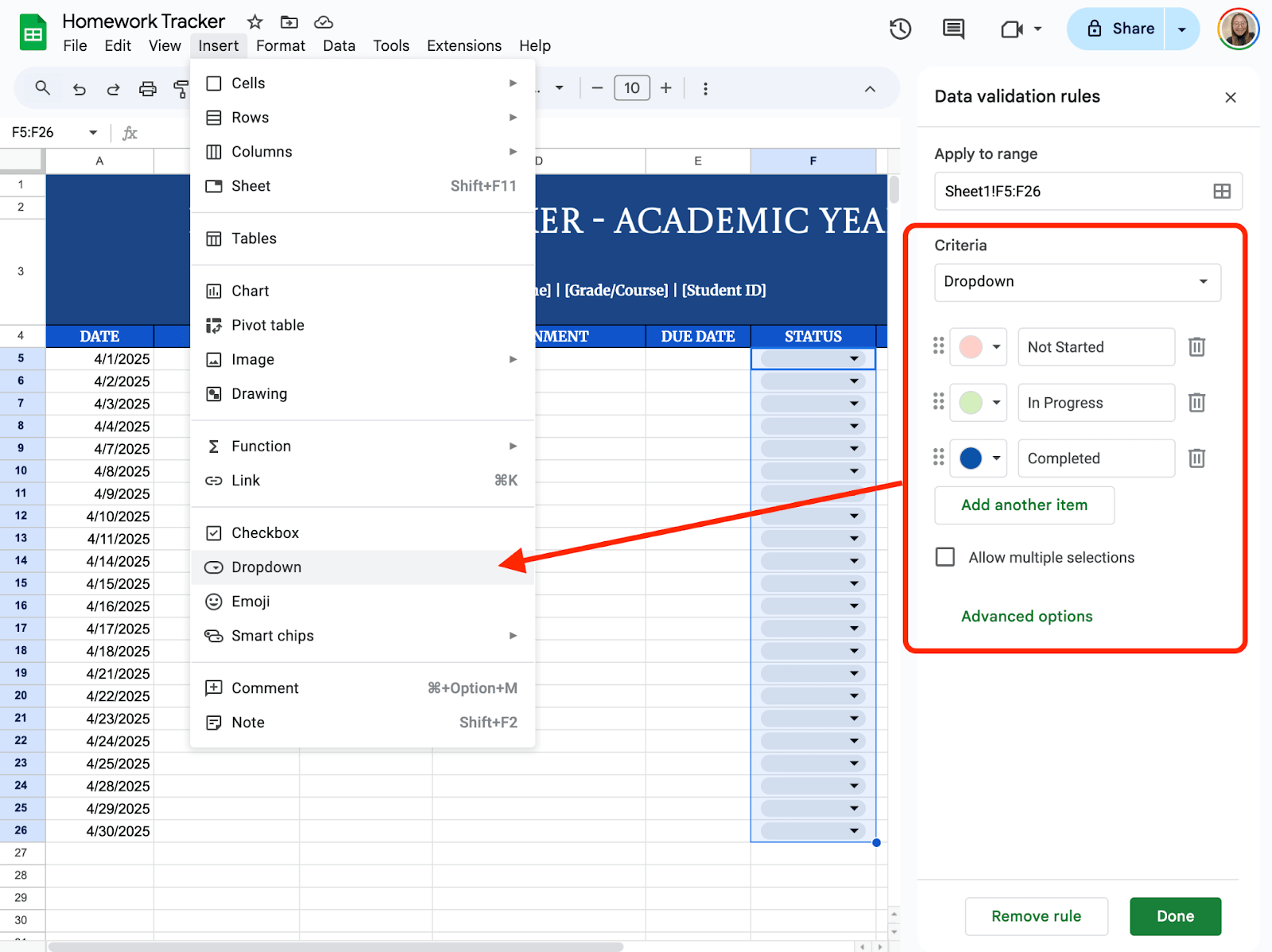
Step 4: Add a Dropdown for Status
To make “Status” easier to manage, add a dropdown. Select the column where you would like tp put your dropdown menu, then click Insert > Dropdown. Enter the options you would like to use. In this case, I’ll use Not Started, In Progress, and Completed.
Step 5: Add a Progress Summary (Optional)
If you want to see how much you’ve done:
Somewhere at the top, use this formula:
=COUNTIF(D2:D, “Done”) & ” completed out of ” & COUNTA(B2:B) & ” assignments”
It gives you a quick snapshot of your progress.

If you want to help your classmates or just save time for the future, turn your sheet into a reusable template. Click the Share button in the top right corner and enter the email address of the person you’d like to share the template with. Then, choose their control: Commenter, Viewer, and Editor.

Get the Free Homework Tracker Template
Get a copy of the free Homework Tracker Template. I’ve populated some cells as examples, but you can customize them as needed.
Final Thoughts
An organized mind really does start with an organized space. This tracker won’t just help you get things done; it’ll help you feel more in control of your school life. And once you make it a habit, it won’t even feel like a chore anymore, it’ll just be your go-to tool.
Frequently Asked Questions
Can I use formulas to automatically highlight overdue homework?
Yes. Use conditional formatting with this formula: =AND(D2<>”Done”, C2<TODAY())
This highlights rows with due dates before today that aren’t marked “Done.”
How can I sort by due date?
Click the little arrow on the “Due Date” column (C1) and choose “Sort A–Z.” That puts the soonest deadlines at the top.
What if I want to track multiple weeks or semesters?
You can add extra sheets within your Google Sheet for different weeks, months, or terms. Just click the “+” at the bottom to add a new tab.
The Bottom Line:
One keeps you awake. The other gets work done.
A month of coffee: $80
A month of FileDrop: $19
Why not have both?


