
Flipbook Maker
PDF to flipbook maker, no ads and highly customizable with different page flip effects.
Share or embed flipbooks creating outstanding magazines, catalogs, brochures, reports, restaurant menus and more.
Convert PDFs into Interactive Flipbooks in Seconds
Turn static PDF documents into polished, professional 3D flipbooks with an easy setup process. Simply upload your file and create an engaging viewing experience — no coding or technical expertise needed.
Realistic 3D Page-Flip Experience
Make your documents more engaging with smooth, lifelike page-turn animations that feel like reading a physical book. Perfect for presentations, catalogs, brochures, magazines, and digital publications.
Responsive on Every Device and Browser
Deliver a seamless experience across desktops, tablets, and smartphones. When 3D rendering isn’t supported, the viewer automatically switches to an optimized lightweight version, ensuring reliable performance and compatibility everywhere.
Personalize
Each flipbook can have a view limit, you can password protect it or you can set it to expire after a few days.
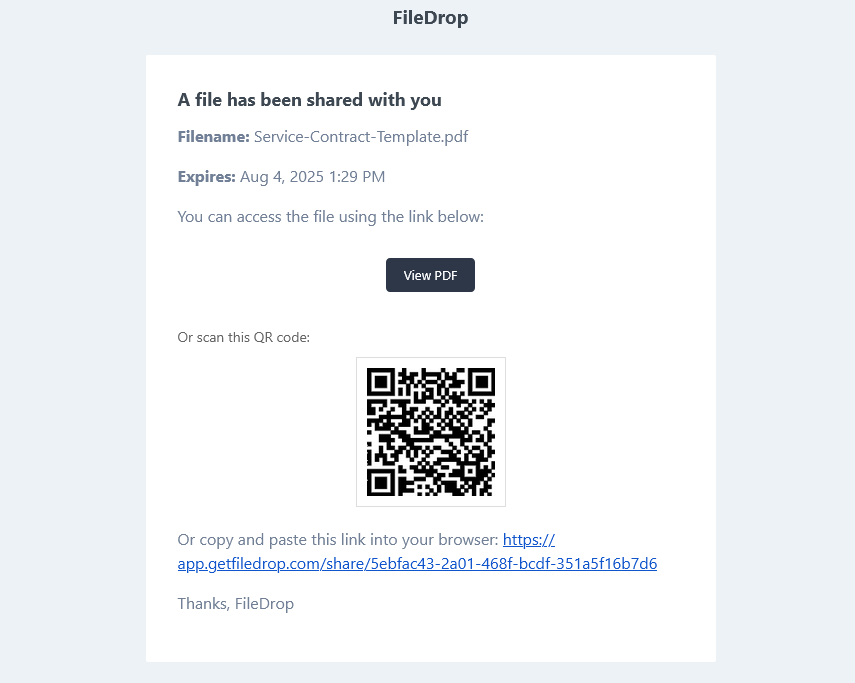
Email invites contain a QR code to open it on another device easily.
FileDrop’s Flipbook Maker Features:
- Realistic 3D page-turning animation
- Touch/swipe support for mobile devices
- Keyboard navigation (arrow keys)
- Thumbnail page preview
- Turn page sound
- Download and Print
- Unlimited views and downloads

-
Drag and Drop Upload Area
We offer the easiest way to upload the file.
-
Limit the number of views
After the limit is reached the file will be unavailable.
-
Share via Email
Share the file via email with a simple invite. The email has also QR code that the
-
QR Code
Receive email notifications from selected forms directly in your inbox.
-
Mobile Friendly
Your users or customers can fill in and send documents directly from their mobile or tablet.
-
Secure
All files are secured with encryption in transit and end to end to keep client data safe.
How to create your flipbook in 3 easy steps
-
Step 1
Add the PDF to our drag-and-drop upload area and select your settings. Click upload and the sharing will will be generated automatically. Optionally, you can set different security settings, like limiting the views, downloads, or adding an expiration date.

-
Step 2
Enable the Flipbook mode.

-
Step 3
Send an invite to a user to share your flipbook link.

-
Step 4
The user will receive an email with the link and also a QR code that can be used from a tablet or phone.
Analytics and stats
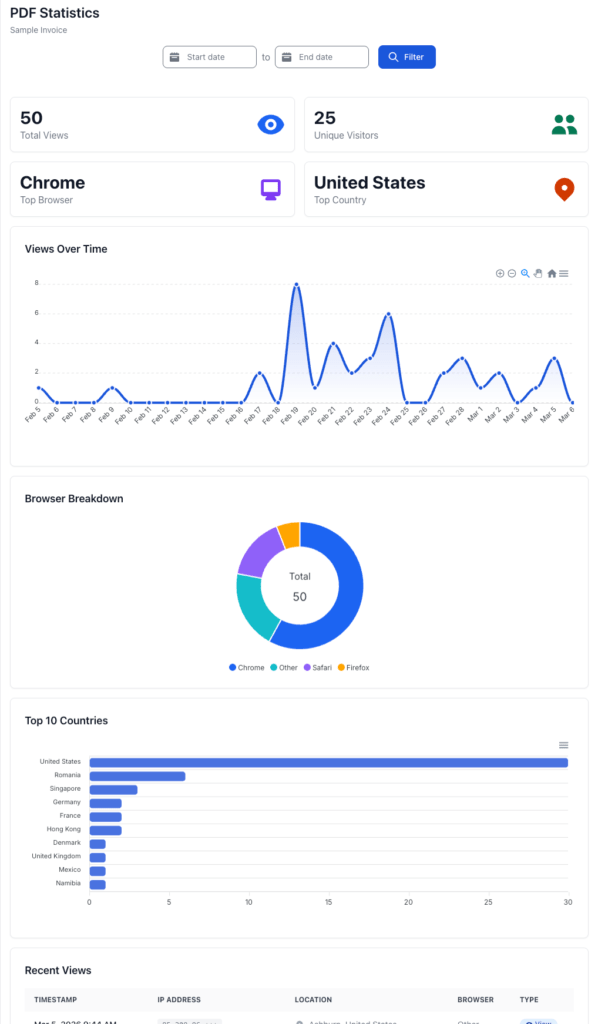
With paid plan users have access to advanced statistics.
These includes unique visitors, country, visits and much more.
FAQ
1. What can I use a flipbook for?
Flipbooks are ideal for catalogs, magazines, portfolios, brochures, and reports. They’re perfect for sharing visually rich content online using a simple link—no downloads or plugins required.
2. How do I create a flipbook with FileDrop?
To create a flipbook, sign up for FileDrop and make sure you’re on a Pro or higher plan. Upload your PDF, enable the Flipbook feature, customize the title and description if needed, then publish and share your flipbook link instantly.
3. What are the requirements for the best flipbook experience?
For optimal quality, upload a high-resolution PDF (print quality is recommended). The current upload limit is 100 MB, so larger files should be optimized. Make sure margins are consistent to ensure the best visual presentation across all pages.
4. Do viewers need to download anything to read the flipbook?
No. Flipbooks created with FileDrop are fully web-based and open directly in the browser. Viewers don’t need to download files or install plugins—just click the link and start flipping pages.
5. Is the flipbook mobile-friendly?
Yes. FileDrop flipbooks support touch and swipe gestures on mobile and tablet devices, along with keyboard navigation on desktop, ensuring a smooth experience across all devices.
6. Can I control access to my flipbook?
Yes. You can restrict access to your flipbook using FileDrop’s PDF Hosting options. Most access controls are available, with the exception of watermarks, which are not supported for flipbooks at this time.