
File upload forms
File upload forms that deliver straight to your storage
Build a branded upload page in minutes. Share the link, embed it, or send tracked invites. Every file lands in your Google Drive, Dropbox or OneDrive — and every answer lands in a spreadsheet row.
- Unlimited forms
- 1 GB per file
- 12 field types
- No storage cap
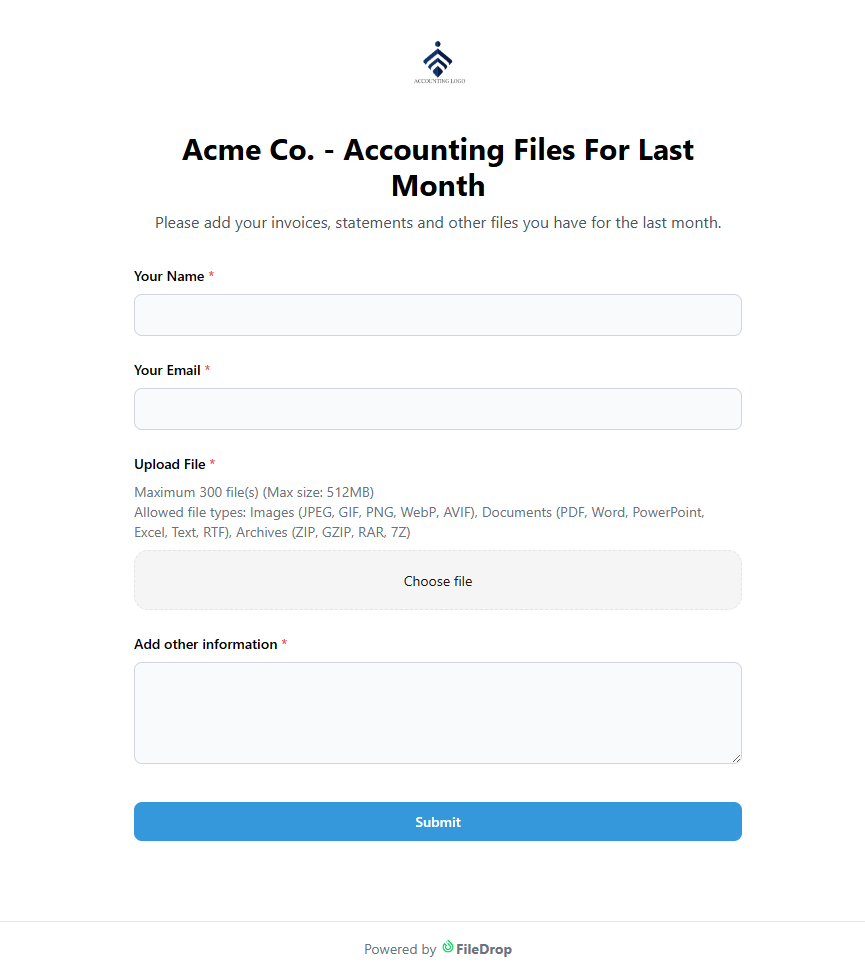
A real FileDrop form — go ahead, submit it
Most form builders stop at a submission. None of the four in the comparison below route the file onward to your own storage.

Three steps
Build it, send it, collect it
A working form is about a minute away. The rest is chasing, and FileDrop does most of that for you.

Build it
Every new form opens with name, email and an upload field already in place. Add, remove or reorder from twelve field types, then drop in your logo and brand colour.

Send it
Share the link, embed it in a page, or send personalised email invites. See who opened it, who read it and who still hasn’t replied — then send a reminder.

Collect it
Submissions arrive in your dashboard with the files attached. Push them to Google Sheets, Excel or Airtable in one click. Invites close themselves once they’re answered.
The product
Top features of FileDrop upload forms
Four of them do most of the work.

The builder
A form designer that starts where you need it
The designer opens with the minimum you need to collect a file, so you are not deleting fields before you can begin. From there: organise uploads into subfolders or Shared Drives, gate them behind a CAPTCHA or a password, and reach for conditional display and repeatable field groups when a workflow gets complicated.
Twelve field types
- Text
- Paragraph
- File upload
- Checkbox
- Radio
- Dropdown
- Date
- Number
- Signature
- Page break
- Conditional fields
Highlighted fields are the ones the comparison below shows sitting behind a paywall elsewhere.
For the person filling it in
Nothing to install, no account to create
Drag and drop from the desktop, or pull files straight out of Google Photos, Dropbox or OneDrive. Forms work on iPhone, iPad and Android, which matters more than it sounds — most people answer these from a phone, camera roll and all.
Every form can carry its own intro text and logo, so a form from your finance team does not have to look like one from HR.

Scan it. This opens the demo form on your phone, exactly as one of your respondents would see it. Or open it here.

Signatures
Get it signed in the same step
Add one signature field or several. Each signature is saved as a PNG in the form owner’s Google Drive, and the link to it is written into the same Google Sheets row as the rest of the response — so the paperwork and the proof stay together.
Attach the signature to the confirmation email if you need a copy on record. Signature fields are required by default, so nobody submits without signing, whether they are on a desktop, a tablet or a phone.
Notifications
Everyone who needs to know, knows
Send new-submission alerts to as many addresses as you like — useful when a whole team is watching for leads or paperwork rather than one person.
Submitters can get their own confirmation too, with a copy of everything they sent, which cuts down the “did you get it?” emails.

Included
What you get, grouped by the job it does
Eleven things worth knowing about, sorted by where they sit in the work.
01Collecting
- Cloud integrationsRespondents upload from a PC or Mac, Google Photos, Dropbox or OneDrive. Google Drive as a source is on the way.
- Mobile friendlyFill in the form and send documents from any phone or tablet.
- Unmatched upload speedFast uploads regardless of device or where in the world someone is sitting.
- Custom branded pagesYour logo and your colours on the page people actually see.
02Chasing
- Email requests and invitesInvite people to a form built for them. Send several invites per person and see whether it was opened or filled in.
- RemindersNudge whoever has not sent the documents yet, without writing the email yourself.
- Email notificationsAlerts from the forms you choose, straight to your inbox.
03Landing
- Save files to Google DrivePoint a form at your Drive from its settings and the files go there.
- Export to Google SheetsSend every submitted file and answer to a sheet with one click.
- As much space as neededWe do not count the number of files or the storage you use on the platform.
- Bank-grade securityEncryption in transit and at rest, hosted on AWS.
Works with the tools you already pay for
Storage, spreadsheets and the rest of your stack.

Two minutes
Watch a form get built
Side by side
How it compares
Most of these are excellent form builders. The difference shows up once a file is attached and has to go somewhere.
| Feature | FileDrop Forms | Google Forms | Typeform | JotForm | Paperform |
|---|---|---|---|---|---|
| File upload fields | ✓ | ✓ | ✓paid | ✓paid | ✓paid |
| Auto-route files to Google Drive / Dropbox / OneDrive | ✓ | — | — | — | — |
| Virus scanning on uploads | ✓ | — | — | — | — |
| Document collection portal (OTP-gated) | ✓ | — | — | — | — |
| Approval workflow | ✓ | — | — | ✓paid | — |
| Conversational (one-question-at-a-time) mode | ✓ | — | ✓ | ✓paid | ✓ |
| Google Sheets sync | ✓ | ✓native | ✓paid | ✓paid | ✓paid |
| Airtable sync | ✓ | — | — | ✓paid | — |
| Recurring email campaign scheduler | ✓ | — | — | — | — |
| Per-invitation read/responded tracking | ✓ | — | — | — | — |
| Repeatable field groups | ✓ | — | — | ✓paid | — |
| Signature field | ✓ | — | — | ✓paid | ✓paid |
| Import from Google Forms | ✓ | n/a | — | — | — |
| Response metadata (IP, location, device) | ✓ | — | ✓paid | ✓paid | — |
| Password-protected forms + embeds | ✓ | — | — | ✓paid | ✓ |
| Webhooks | ✓ | — | ✓paid | ✓paid | ✓paid |
| Custom domain | ✓ | — | ✓paid | ✓paid | ✓paid |
| Subuser / team access | ✓ | ✓Workspace | ✓paid | ✓paid | ✓paid |
| QR code generation | ✓ | — | — | ✓ | — |
| Bulk ZIP download | ✓ | — | — | — | — |
Comparison compiled from publicly documented plan features. “paid” means the capability exists but sits on a higher tier.
Who uses it
Built for teams that spend their week chasing paperwork
Agencies
A single upload page where clients and freelancers drop files and answer a few questions. It goes to your cloud instead of clogging up an inbox.
Accounting and finance
Branded drag-and-drop pages for bank statements, personal details and the rest of it — in one place rather than scattered across six email threads.
Legal
Document collection that runs itself, so file size limits and missed emails stop holding up a case.
Human resources
An upload portal where candidates send résumés and answer screening questions. Everything is saved in our cloud, so you are not buying more storage.
Frequently asked questions
What is FileDrop File Upload Forms?
A secure, branded file collection tool. You build a customisable upload form with drag and drop, share it, and collect files and data from anyone — no account needed on their end.
What fields are available?
Twelve field types, with conditional display, file filters and automatic renaming:
- Text
- Paragraph
- File upload
- Checkbox
- Radio
- Dropdown
- Date
- Number
- Signature
- Page break
- Conditional fields
Can I create branded upload forms?
Yes. Each form takes your logo, your colours and its own intro text, so you can give a different look to a different team or department.
Are the forms mobile-friendly?
Yes. People can fill in forms and upload files from any phone or tablet, including iPhone, iPad and Android.
How large can each uploaded file be?
Up to 1 GB per file, with unlimited files on the Pro, Business+ and Executive plans.
How many forms can I create?
- Free plan: one form
- Pro and above: unlimited forms
Where can people upload files from?
From their own device (PC or Mac), and directly from Google Photos, Dropbox or OneDrive. Google Drive as an upload source is on the way. Whichever they use, the file ends up wherever you have told the form to deliver it.
Is file upload secure?
Yes. Files are encrypted in transit and at rest, and hosted on AWS.
How fast is the upload speed?
Fast, regardless of the device someone is on or where they are uploading from.
How do I receive the files?
Submissions land in your dashboard with the files attached, ready to download. You can also have email notifications sent when someone submits, and route the files themselves to Google Drive, Dropbox or Airtable.
Can I track responses and invites?
Yes:
- Send personalised invites by email
- See whether the email was opened and whether the form was submitted
- View responses and uploaded files in your dashboard
What is the process to collect files?
- Step 1 — create your form with the default fields (name, email, upload), or customise it
- Step 2 — share the link or send an invite
- Step 3 — get notified, and manage submissions from your dashboard
Still stuck? Get in touch and a person will answer.
Your first form is free
Build it, send it, and see where the files land. No card, no trial clock — one form on the free plan, unlimited once you upgrade.