Create a PDF Resume Link
Share your resume and cover letter in a single link
Share Your Resume Professionally
Resume.hr offers a professional way to host and share PDF files online like resumes and cover letters that can easily be shared with recruiters, agencies and potential employers.
Easy to Use for Users
Drag and drop files, or upload the files from multiple sources like PC, phone, Dropbox or OneDrive.
Personalize
Each file can have a view limit, you can password protect it or you can set it to expire after a few days.
Mobile Friendly
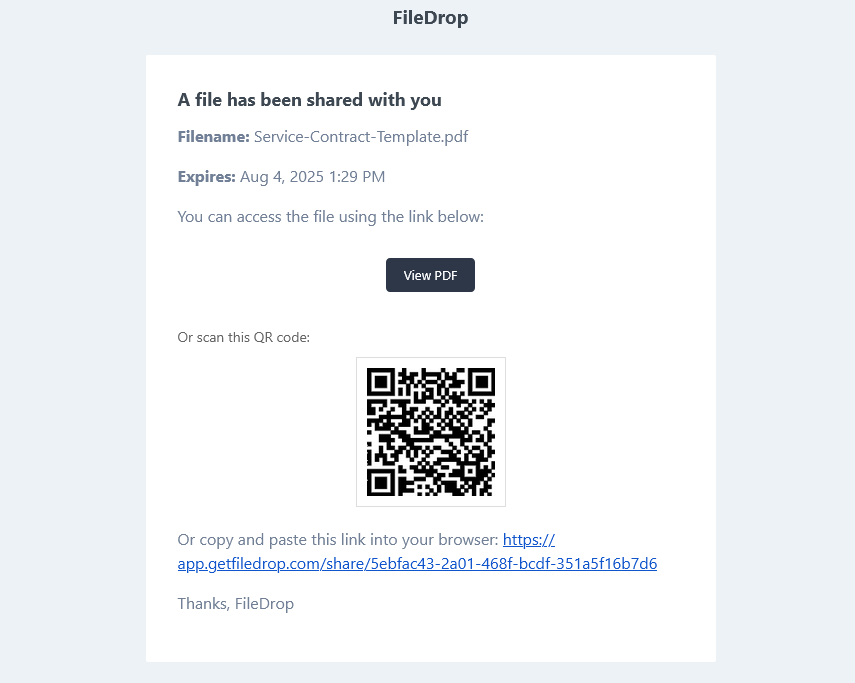
The files are mobile-friendly and can be easily viewed on any mobile device. Email invites contain a QR code to open it on another device easily.
- Simple drag and drop upload
- Multiple files per link
- Limit the number of views
- Set expiration date
- Email Invites - Share to users via email
- Automatic QR code for all files

-
Drag and Drop Upload Area
We offer the easiest way to upload the file.
-
Limit the number of views
After the limit is reached the file will be unavailable.
-
Share via Email
Share the file via email with a simple invite. The email has also QR code that the
-
QR Code
Receive email notifications from selected forms directly in your inbox.
-
Mobile Friendly
Your users or customers can fill in and send documents directly from their mobile or tablet.
-
Secure
All files are secured with encryption in transit and end to end to keep client data safe.
How to share your resume in 3 easy steps
-
Step 1
Add the PDF to our drag-and-drop upload area and select your settings. Click upload and the sharing will will be generated automatically. Optionally, you can set different security settings, like limiting the views, downloads, or adding an expiration date.

-
Step 2
Optionally share the file with our email invite option.

-
Step 3
Send an invite to a user to share your resume link.

-
Step 4
The user will receive an email with the link and also a QR code that can be used from a tablet or phone.