


If you want to customize your File Upload Forms or the PDF hosting links the custom domains will provide you with access to have the entire flow onbrand along with the personlization with logo and colors.
Let’s get started.
In the FileDrop app go to the Custom Domain menu and add your subdomain as shown in the photo. You can use any subdomain you want – this feature is available to all users with a Business+ plan or higher.

The next step is to add the DNS records we provide in your DNS provider. In this image we are adding the records in Cloudflare. We add an A record with the subdomain that matches what I added in FileDrop, the IP and here I need to disabe the proxy.

Please wait 5-10 minutes for the DNS propagation. The domain activation is done automatically but you can click the Check Status button to verify the status manually after this time.

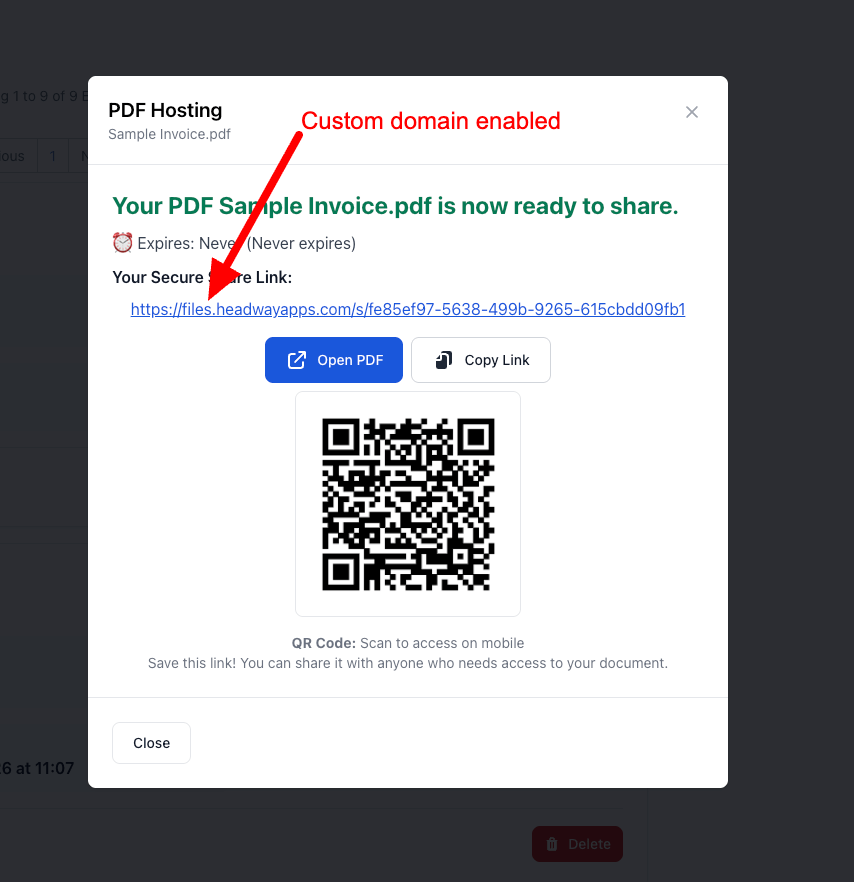
If the DNS settings are correct the domain is activated, the SSL is enabled and the links for File Request Pages and PDF Hosting files are automatically updated in the FileDrop platform.
Instead of the FileDrop.me subdomain that is available to all users now we have a nice brand subdomain.
Conclusion
The Custom Domain it’s easy to setup and brings a ton of value to any business that wants to look professonial in front its users or customers.
The Bottom Line:
One keeps you awake. The other gets work done.
A month of coffee: $80
A month of FileDrop: $19
Why not have both?


