
Bulk OCR for PDFs and images
Turn multiple scanned PDFs and images into editable text in one job. Choose the OCR settings, track the batch, then download TXT, XLSX, DOCX, or separate text files.

How to OCR multiple PDFs and images
Upload 2–100 PDF, PNG, or JPEG files, then select a language and OCR engine. FileDrop submits the batch as one job and shows its progress in your dashboard.
- Add scanned PDFs, photos, or image files to the same batch.
- Choose the OCR language and an available engine.
- Start OCR and follow the pending, processing, or completed status.
- Download a combined export or separate text files in a ZIP.
Already working in Google Drive?
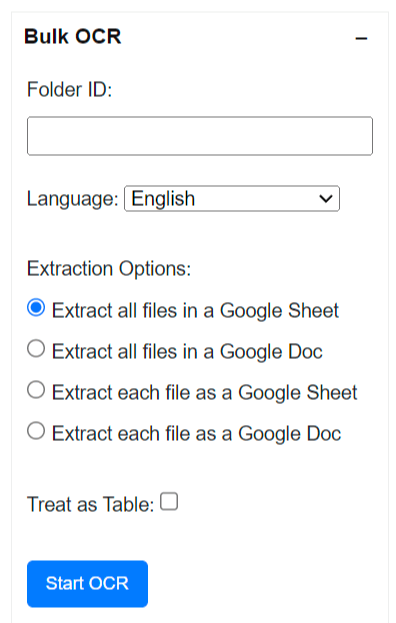
Bulk OCR is also available in the FileDrop Google Workspace add-on. Open Plus Tools, choose Bulk OCR, and process JPG, PNG, or PDF files from a Drive folder. Send the extracted text to Google Sheets or Docs, combined or per file.
See the OCR options overview or the add-on instructions.
Download one result or a file for each document
Choose a combined TXT file for plain text, XLSX for reviewing results in a spreadsheet, or DOCX for editing in a document. Each combined export identifies the source filename beside its extracted text.
For one result per source, download a ZIP of individual TXT files. This is useful when you need to keep the extracted text associated with each original document.
Track each OCR job
The dashboard shows pending, processing, completed, and failed jobs. FileDrop emails you when a job completes successfully and makes its download available in the app.
Your remaining file allowance appears before you start another batch.
When to use bulk OCR
OCR, or optical character recognition, reads text in an image or scanned PDF. Use batch OCR when you have a folder of documents whose words cannot be selected or copied, and you want their text in an editable format. A PDF with existing selectable text may not need OCR.
Common batch OCR tasks
- Extract text from scanned invoices, receipts, forms, or letters.
- Turn photographed pages and JPEG or PNG files into text you can search or edit.
- Consolidate many document results into one spreadsheet or document.
- Keep each file’s text separate when you need to review it alongside the original.
Prepare files for better OCR results
Use a clear, upright scan or photo and choose the document’s language before starting the batch. Crop away large borders where practical. Blurry images, shadows, handwriting, and complex tables can reduce recognition quality, so check the finished text against the originals.
After the batch finishes
The dashboard shows whether a job is pending, processing, completed, or failed. A successful job makes the download available in the app and sends a completion email. You can see your remaining file allowance before starting another batch. For a quick check with one document, try free OCR.
Frequently asked questions
Which files can I upload?
Bulk OCR accepts PDF, PNG, and JPEG files. Submit 2–100 files in a batch. The file-size limit shown in the uploader depends on the OCR plan configured for the app.
Which download formats are available?
Export the full batch as one TXT, XLSX, or DOCX file, or download a ZIP with a separate TXT file for each source.
How many files can I process?
Your allowance depends on your plan and billing cycle. FileDrop shows your remaining file count on the Bulk OCR screen. See current pricing for plan details.
Can I test OCR with one file?
Yes. Try the free OCR tool to check the extracted text.
Does bulk OCR create a searchable PDF?
No. Bulk OCR extracts text from your files and provides text-based downloads. It does not return a new searchable PDF.
Will I need to check the extracted text?
Yes. OCR accuracy depends on image quality, scan angle, language, and page layout. Review important names, numbers, and tables against the originals before using them in a workflow.