


A new lead lands in your sheet, or a support ticket row gets added, and nobody sees it until someone happens to open the spreadsheet. The usual fix is Zapier — connect Sheets, connect Slack, and create the flow for notifications.
There’s a simpler path if the only thing standing between your sheet and Slack is a notification using FileDrop Automations.
The Apps Script route (and why most people skip it)
You can write a Google Apps Script bound to the sheet that calls Slack’s Incoming Webhook API on an onFormSubmit or edit trigger. It works, but it’s code — you’re maintaining authentication, retry logic, and whatever breaks when Google updates the Apps Script runtime. Fine if you’re comfortable in that world; overkill if you just want a message in #sales when a row shows up.

Doing it without Zapier or code
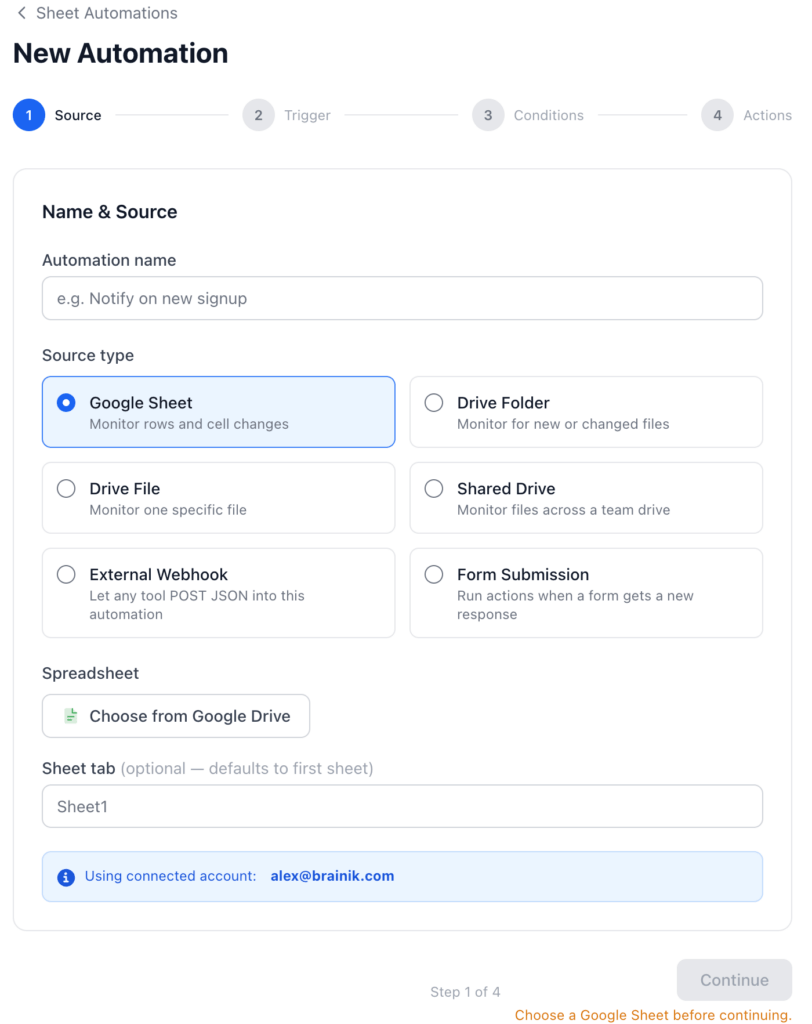
FileDrop’s Google Sheet source has a New row added trigger built for exactly this — it fires when a row is appended to the bottom of the sheet, whether that row came from someone typing it in, a connected Google Form, or a FileDrop form syncing into the sheet.
Setup
- Connect your Google account and choose the spreadsheet (and tab, if it’s not the first one).
- Trigger: New row added.
- Optional Conditions — filter by any column so you’re not notified on every single row. For example:
PriorityequalsHigh, orStatusis not empty. Conditions support equals/not equals, contains, starts/ends with, and is one of/is none of a list — and you can require all of them or just one. - Add a Slack action:
- Slack Webhook URL — from your Slack workspace’s Incoming Webhook settings
- Message — built from placeholders, e.g.
New lead: {column:Name} ({column:Email}) — {column:Source}
- Save. The automation starts firing on the next row added after that.
That’s the whole setup — no separate platform, no per-task pricing, no second account to manage.
A real example
Sales team, new-lead alert:
- Source: Google Sheet, watching the
Leadstab - Trigger: New row added
- Action: Slack →
#sales, message:New lead: {column:Name} — {column:Company}. Source: {column:Source}
Whoever’s watching #sales sees it within seconds of the row landing — no one has to check the sheet.
Status-based alert instead:
If you’d rather post only when something changes state rather than when a row first appears, swap the trigger for Cell / status change, scope it to your Status column with Only when new value equals set to Closed Won, and the Slack message fires only on that transition — deal closed, not deal created.

Prefer Google Chat, or both?
The Google Chat action works the same way — paste a Space’s webhook URL, write the message. Nothing stops you from adding both a Slack action and a Google Chat action on the same trigger if different teams live in different tools; actions run in the order you add them.
Where this beats Zapier specifically
Zapier’s free tier polls on a delay (often 1–15 minutes) unless you’re on a paid plan. FileDrop reacts to Google’s own change notifications, so it’s typically seconds, not minutes — and because the sheet is already the thing you’re monitoring, there’s no second account to create or a separate zap to maintain when the sheet’s structure changes.
Start your first automation free
The Bottom Line:
One keeps you awake. The other gets work done.
A month of coffee: $80
A month of FileDrop: $19
Why not have both?


