

When tax season rolls around, one of the biggest headaches for accountants is chasing down client documents. Emails pile up, attachments get lost, and sensitive financial data is scattered across inboxes. Not only is this inefficient—it’s also risky.
That’s why many firms are now moving to a secure file request portal. Instead of sending endless email reminders, you can give clients a simple, secure link where they can upload tax returns, receipts, W-2s, or bank statements directly into your system.
With FileDrop, accountants can set up a branded, no-code file request portal in just 3 minutes. Here’s how it works.
Why Accountants Need a Secure File Request Portal
Before we dive into setup, let’s look at the key reasons this matters for accounting firms:
- Security & Compliance – Protect client documents with encryption in transit and storage. Avoid insecure email attachments.
- Efficiency – Eliminate back-and-forth emails and manual filing. Files arrive neatly organized.
- Client Experience – Clients don’t need accounts or logins. They just click a link and upload securely.
- Scalability – Whether you handle 10 clients or 1,000, portals ensure a consistent, professional process.
Step-by-Step: Setting Up Your File Request Portal in FileDrop
With FileDrop, you don’t need IT support or coding skills. In just a few minutes, you can launch a branded, secure portal for clients to upload financial documents. Here’s how:
Step 1: Create Your Free FileDrop Account
- Go to FileDrop Registration.
- Sign up with your work email.
- Once registered, you’ll land in your FileDrop dashboard—the central hub where you’ll build and manage all client file request portals.
Think of this dashboard as your “control center” for securely collecting client documents.

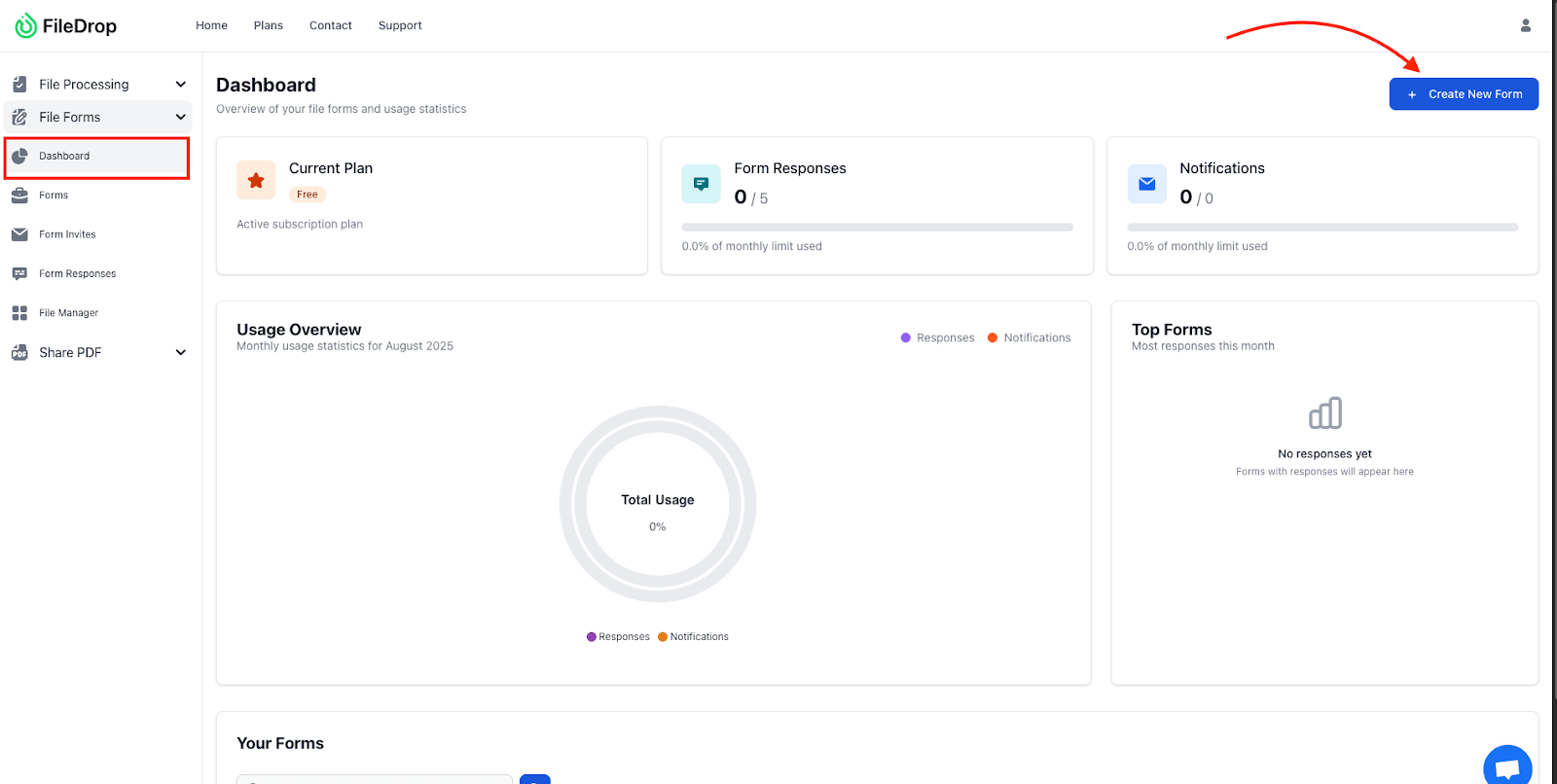
Step 2: Access the File Forms Dashboard
- In the dashboard navigation menu, click File Forms.
- This is where you create and manage upload portals. Each form acts as a dedicated submission page for clients.
- Example: You could have separate portals for Tax Returns, Bookkeeping Docs, or Audit Requests.
Step 3: Create a New File Request Form
- Click + New Form.
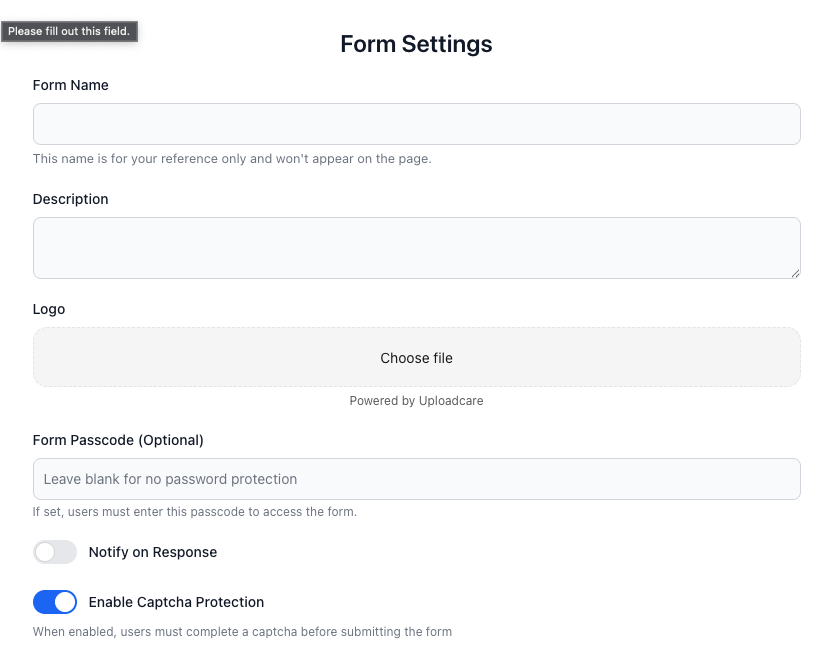
- Fill out the basics:
- Form Title: “Upload Your Tax Documents Securely”
- Description: Example: “Use this secure portal to upload your financial documents. Files are encrypted in transit and automatically stored in our Google Drive. No login required.”
- Upload Logo: Add your firm’s logo for a professional touch.
- Form Passcode (Optional): Add a code if you want to restrict access to invited clients only.
This step ensures clients immediately recognize your firm and trust the security of the portal.
Step 4: Connect Google Drive Integration
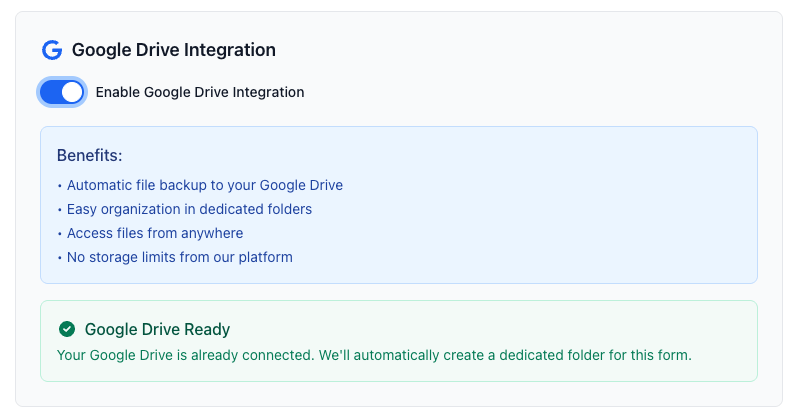
- Click Connect Google Drive.
- Sign in with your Google account.
- Choose or create a dedicated folder (e.g., “2025 Client Tax Docs”).
From now on, every client upload will be saved automatically in that folder—eliminating manual downloads, lost attachments, or mix-ups.
Step 5: Add Client Instructions & Branding
Make your portal both clear and professional by customizing the client-facing form:
- Form Title – Example: “Upload Your Tax Documents Securely”
- Form Frontend Text – Example: “Please upload your tax documents here, including W-2s, 1099s, expense receipts, and bank statements. You can drag and drop multiple files at once.”
- Background Color – Match your firm’s website or portal design.
- Font Color – Ensure text is easy to read on your chosen background.
- Button Color – Align with your brand’s accent color (e.g., firm’s logo color).
- Button Text Color – Keep it high-contrast for visibility (e.g., white text on dark button).
By aligning these details with your firm’s visual identity, your file request portal feels like a seamless extension of your website, rather than a generic third-party tool.

Step 6: Add Fields to Collect Metadata
FileDrop isn’t just for file uploads—you can capture useful client info too. Examples:
- Text Field: Full Name (required)
- Email Field: Client Email Address (required)
- Dropdown Field: Tax Year (2024, 2025, etc.)
- File Upload Field: “Upload Your Documents” (multiple files allowed)
These extra fields help you quickly match submissions to the right client and keep everything organized.

File Upload Settings (Important)
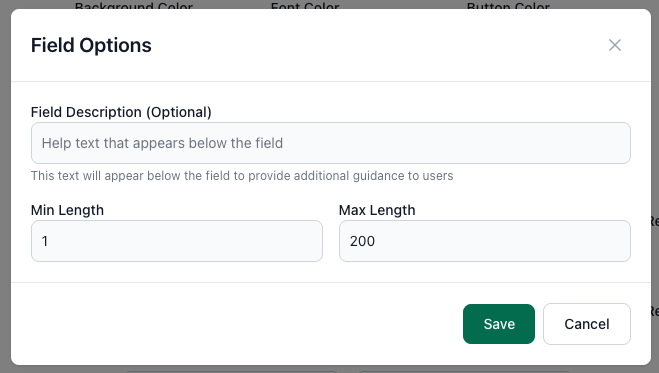
When you add a File Upload Field, click the gear icon to open the Field Options panel. Here’s how to configure it for tax document collection:
- Field Description (Optional): Add guidance so clients know exactly what to upload. Example: “Please upload all relevant tax documents, including W-2s, 1099s, receipts, and bank statements. You can drag and drop multiple files at once.”
- Min Length / Max Length:
- Min Length = 1 ensures the client uploads at least one file.
- Max Length = 200 prevents overly long filenames or excessive entries, while still allowing flexibility.
- Required Checkbox: Always check this so clients cannot skip uploading their tax documents. This prevents incomplete submissions and ensures your team has everything needed to get started.
- Click Save Form to store your settings.
- Click View to preview the portal and confirm:
- Logo displays correctly.
- Instructions are clear.
- All required fields are in place.
- Share the portal link with clients:
- Add it to your engagement letters.
- Embed it in your firm’s website or client portal.
- Send via email campaigns when requesting documents.
Clients don’t need a Google or FileDrop account—they simply click the link, upload their files, and you receive them instantly.

Step 8: Track Submissions in Google Sheets (Optional)
If you want a live log of submissions, connect your portal to Google Sheets:
- In the File Forms dashboard, click the Google Sheets icon next to your form.
- Approve the prompt to auto-generate a spreadsheet.
- The sheet will include:
- Client Name
- Email Address
- Document Type
- Date Submitted
- Link to File in Drive
Now you’ve got a real-time, searchable database—perfect for compliance checks, audits, or quickly locating a missing document.

Step 9: Review and Process Files
Your HR team (or in this case, your accounting team) can now:
- Open client folders in Google Drive instantly.
- Use the Sheets log to track who has submitted and who hasn’t.
- Forward files directly into accounting or tax-prep software.
No more email chains. No more missing attachments. Just a secure, organized system for client document collection.
Best Practices for Accountants Using FileDrop
To get the most out of your portal:
- Set Deadlines – Add submission deadlines to keep tax season on track.
- Use Consistent Naming – Automate file naming with FileDrop rules.
- Group by Client – Create separate folders per client in Google Drive for clarity.
- Automate Workflows – Use Zapier to send confirmation emails or update CRMs automatically.
Benefits for Your Accounting Firm
Implementing FileDrop goes beyond convenience—it fundamentally upgrades how your firm handles document collection:
- Time Savings – Stop chasing clients for missing attachments or sorting through endless email chains. Documents are automatically funneled into organized Google Drive folders.
- Professionalism – Present clients with a sleek, branded upload portal that reflects your firm’s commitment to security and efficiency.
- Compliance & Security – End-to-end encryption, access controls, and audit-friendly records help safeguard sensitive financial data and maintain compliance standards.
- Scalability – Whether you’re managing 10 clients or 1,000, you can replicate the system for each client and tax year—without adding IT overhead.
- Peace of Mind – Both your team and your clients can rest easy knowing submissions are always secure, organized, and retrievable on demand.
Conclusion
Gone are the days when accountants needed expensive software or dedicated IT staff to set up secure portals. With FileDrop, you can launch a professional, branded file request system in just 3 minutes.
Your clients enjoy a seamless, stress-free upload experience, while your firm gains organized, automated, and compliant document collection—saving hours every week during tax season and beyond.
Ready to simplify your document collection? Create your free FileDrop account today and set up your first secure file request portal in minutes.
The Bottom Line:
One keeps you awake. The other gets work done.
A month of coffee: $80
A month of FileDrop: $19
Why not have both?


